
The AMD Radeon Vega 8 is an integrated graphics processor used in the AMD Ryzen 5-series main processors for laptops. The Radeon Vega 8 can be used for light gaming. It offers performance similar to basic graphics of common laptop processors, such as the Intel UHD graphics of the Intel Core CPUs. A step up in the AMD Radeon Vega line is the Vega 10 of the Ryzen 7 chips, offering improved performance, but still in the light gaming category.
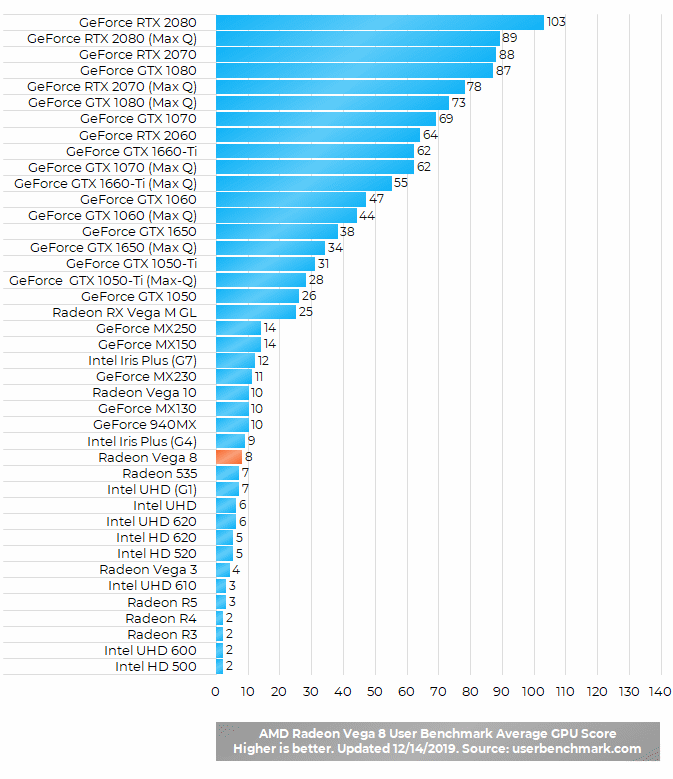
AMD Radeon Vega 8 Graphics Benchmark
Here’s a benchmark test of the Radeon Vega 8 graphics processor, incorporated into the popular AMD Ryzen 5 3500U main processor. It’s compared to other widely used graphics processors for laptops.
You can watch Vega 8 gameplay videos in the Reviews, Q&A, and Videos section below on this page.
Gameplays on the Vega 8 graphics of the Ryzen 5 3500U: Fortnite, PUBG, GTA 5, CoD, Battlefield, CS:GO, Dota, and more.
https://www.youtube.com/watch?list=PL_sfYUCEg8Og2W6xixmaU25Q028VQY0sT&v=fOF61_IKnHo
Do Amd Radeon vega 3 have 2gb ?
If you’re asking about real / physical memory of the Vega 3, it doesn’t have any. It uses the main RAM memory of the computer, with amount of it depending on a task. I’m not sure the maximum amount of RAM Vega 3 can utilize, but 2GB usage is generally often supported by modern integrated graphics processors such as the Vega 3.
How to increase amd radeon vega 8 vram dedicated memory upto 4gb
what is dedicated memory size of radeon vega 8 graphics?
The Vega 8 integrated graphics of the AMD Ryzen processors doesn’t have its own dedicated video memory. It uses the main system memory (RAM) for graphics rendering purposes.
How many FPS can the AMD Radeon Vega 8 support?
I don’t have much budget I’m buying ryzen 5 laptop with Vega 8 integrated graphics can it run games below 2019 year at a lagg free fps please reply anyone?
Ryt now playing gta 5, cs go, valorant and pubg emulator on it. No problem at all. And about 50-60fps getting smoothly
On GTA V 30-40fps
Valorant 60-70fps
Csgo 60-70fps
The witcher 3 30fps
Add a dual channel ram to get 8-17 more fps on GTA V, VALORANT, CSGO but not on The Witcher 3 cause you know it’s a heavy game
Yes,with Vsyn on On Valorant, I get 60, but Vsyn off gives me 80–120Fps @1080p Such a OP piece of Hardware Vega 8 is !
can I run Call of Duty:Warzone on Vega 8 ?
low settings 720 at like 45 fps
Yeah sure at low settings 1080p the game runs lag free smooth.
Mr Havoc don’t lie to a man I have Ryzen 5600G and 16 GB DDR4 Kingston Fury Beast my Vega 8 came with 2 GB VRAM I Boosted in bios at 4 GB VRAM and I will buy another 16 GB Of Kingston Fury Beast and then boost to 8 GB VRAM I know how to do that what I’m trying to do now is boosting bus from 64 bit’s to 128 bit’s that would double the performance in instant and according to AMD Website it is doable
I have ho ryzen5 Radeon Vega 8 can I run free fire and GTA 5 game ???
Yes i play free fire and gta 5 on it. 8gb ram might have a problem running gta online but if you will upgrade it to another 8gb ram which means dual channel it will increase performance by 15 to 30 percent in all of your games. I play gta online and i usually get 25 to 30 fps if the server is containing like 20 people. But in normal gta 5 or gta online alone session you might get 40 to 50 fps but after upgrading to 8×2 gb ram you will get 50-75 fps and in gta online you will get 35-50fps if the server is containing 20 people. Free fire i run using msi app player and i get 60 fps on training ground smooth settings. Im using a 8gb ram laptop btw 16 gb ram will increase performance and you can set the game at medium or ultra settings shadow off and you should get around 50fps. You can also increase performance by overclocking your processor by ryzen controller. Idk how to overclock it but i know that for overclocking you should have a cooling pad or you can get your laptop too hot that it can fry eggs in it. But if you have cooling pad and you overclock it then the performance will increase more and you will not have any problem running both of the games. I hope you understand now
Can it run adobe creative cloud?
Bro a question
I have bought acer aspire 3 laptop of 4 gb ram and i got 512 mb vram (vega 8)
While in youtube vedios some people bought the same laptop of 8 gb ram and they got 1gb vram
So if i upgrade my ram wit also automatically increase vram
No the vram capacity is fixed. However game performance is not determined by vram because the vram is still extracted from system memory. However if you use dual channel ram, that is, 2 ram modules of the same capacity and speed, you will get a 15-30% increase in performance. Note that the fixed vram capacity is extracted from the ram hence it is unavailable for use in Windows.
which supports multiple displays the AMD RYZEN 5 or the RADEON graphics 5
Can I run Optishot2 golf simulator?
Can u use filmora editing with this?
I don’t wanna sound stupid but if I look in my computer case I literally can’t see my gpu (I have this one) and I wanna replace it but how am I gonna do that without getting rid of this one? Cuz I actually only see my fans my WiFi thingy my motherboard, storage the cpu and power supply.. nothing else.. I am new with computers so yeh maybe I’m just stupid but someone pls help
your cpu and gpu are integrated together, your gpu is in your cpu in short, you don’t need to get rid of the gpu, you can safely just install a different gpu in your motherboard but this cpu (or rather apu) is pretty weak, it’s like only good for really light gaming (most 3d games just don’t work lol, nights in the woods runs like garbage xD) so I would reccomend buying a new ryzen cpu and then getting a gpu
you can go on reddit and ask people there or watch LinusTechTips to get more education about pc building
Does your computer use Radeon graphics that is integrated into the main processor? It is possible to have a PC without a dedicated video card, if the main processor features integrated graphics. By the way, if you’re referring to a laptop computer, then graphics and the main processor are not upgradeable.
If i put a faster RAM into my system will the graphics benefit from that change? Or will it be the same performance no matter the speed
can increasing the ram size on my laptop increase the vram of the laptop? ’cause i have the radeon vega 8 with only 512mb vram at 4gb ram
Many notebooks with the Radeon Vega 8 and 8GB RAM have 2GB of it reserved for the Vega 8. So, it is possible to have more than 512MB of shared memory with the Vaga 8. Usually, laptops with the Vega 8 and other integrated graphics processors have in their BIOS settings an option to set maximal RAM amount that laptop’s GPU can use.
Looking to get a 34” 2k ultrawide monitor. Will the Vega 8 power that fine?
Can you overclock vega 8 safely?
If you use ryzne controler or amd apu tuning utility (second one is newer and better) you can increase your TDP/STAMP setting, graphics memory setting and graphics core setting and even max temp, however be aware that most nootbooks have bad cooling system and if you increase tdp (which is a must because otherwise processor will be workin in 0.60 ghz) over some point then your laptop can literally melt before your very own eyes, soooooo…………..
YES, you can (a tip for you, if you have $#ITY cooling system dont increase tdp over 17)
* writting from the laptop with ryzen 3500u and vega8
And one more thing, in my case (the one with bad cooling) after changing tdp to 17, temps increased to max 88°C, for a laptop its kinda normal and max temp of ryzen 3500u with vega 8 is 105°C so its shouldn’t do any harm.
Hi. This is my laptop’s specs. I’m currently using HP 15s-eq0067au.
When i purchased it, i requested to upgrade my RAM to 8 GB but it shows here only 6 GB is usable. Does that mean the Vega 8 takes 2 GB from the RAM.
Another question: if i want to upgrade my RAM up to 16 GB, it will show only 14 GB RAM is usable?
Yes, integrated graphics processors including the Vega 8 use RAM memory as video memory, so you have less usable RAM for other purposes. Most laptops have in their BIOS settings an option to set maximal RAM amount that integrated graphics can take.
you can change hardware reserved RAM by chaging “UMA Frame Buffer Size” option. Currently lenovo wont support to change but HP might accept. Check and answer
Ah I see. Thank you for the replies.
I am planning to upgrade it to 12 GB RAM soon.
im using honor magicbook 14 with GPU Radeon™ Vega 8 Graphic integrated graphics card.
Do it support external monitor of 2560×1080 ? pls help. tqtq
As far as I know Magicbook 14 has HDMI 1.4 video output port which supports 2560×1080 resolution. However, it has a lower bandwidth than HDMI 2.0 standard, so you won’t be able to have high refresh rates for extra smooth motion like 120Hz or 144Hz at 2560×1080. In theory, HDMI 1.4 supports 2560×1080 at 100Hz max. The most common refresh rate used by external monitors is 60Hz, so if your monitor is at 60Hz you don’t need a higher refresh rate anyway.
As for the Vega 8 itself, I wasn’t able to find info on maximal refresh rates, but modern GPUs like the Vega 8 regularly support 60Hz even on ultra high resolutions like 4K 3840 × 2160.
The memory bass 64 is Vega 8
How can it be raised The memory bass to 128?
ryzen 3pro 3200g
On most laptop, there’s an option in BIOS settings to increase memory used by the graphics processor, such as the Vega 8. The Vega 8 doesn’t have it’s own video memory, it uses the main system memory – RAM.
Can it run Sims 4 properly?
yes i run wow classic number 1
Hi! Is Vega 8 sufficient to run Adobe Illustrator and Photoshop?
Does Ryzen 5 2500u with vega 8 graphics can have maximum 1 gb vram ? , bcoz i have 12gb ram after ram upgrade, but vram got increased from 512 to 1024mb, & thers no option in BIOS settings to change it to 2Gb. Does Vram is limited to 1gb in R5 2500u?
Hola buenas tardes. Esta Radeon Vega 8 3500U puede correr el juego PUBG ? Muchas gracias
I only have Ryzen 3 3200, vega 8 GPU, and 6 gb remaining RAM usable from 8gb. Can I opt to decrease the 2gb videographics and maximize efficiency for my adobe apps and still can play dota2 in low settings w/out prob? Thanks, it would help me much.
do this specs have record & stream/relive on the AMD settings?
Hi there.. I have just installed an additional 8GB memory on my laptop, bringing it to a total of 16gb. Is there anyway to increase the VRam to more than just 2GB??