
If you are planning to purchase a Windows 11 laptop for everyday use in 2026 but you are on a tight budget, you likely wonder whether 8GB of RAM you can typically find in affordable laptops is enough or should you pay a bit more and go for 16GB RAM instead. Here’s our take and a quick test of 8GB versus 16GB RAM usage with Windows 11 and some common day-to-day apps involved.
The typical programs most people use everyday are web browsers, email clients, office-type apps, media players, image editors, and since recently AI assistants. For the test we used Windows 11, version 25H2 and opened the following apps to run them simultaneously:
- Chrome browser with five websites opened in separate tabs – Youtube, Reddit, Facebook, Wikipedia and Google Search.
- Default Microsoft Outlook email app of Windows 11.
- Copilot AI Windows app.
- LibreOffice Calc spreadsheet program with a 30-row 10-column table file.
- Paint.net image editor with a single .png image opened.
- Spotify music streaming app.
Besides these programs and Windows’ own processes, some common light background apps were up and running, like Steam and Google Drive. Furthermore, about 600MB (~0.6GB) of RAM was utilized by the Intel integrated graphics processor. Depending on the IGP and settings, this RAM usage may be even greater.
We opened the listed apps on a laptop with 8GB RAM and after that we added another 8GB for a total of 16GB to do the same test.
8GB Laptop RAM Usage Test
Let’s first see whether 8GB is enough if we put a moderate real-world workload on, as described above.
As the Performance tab in Windows Task Manager showed, 8GB is barely enough for this daily workload, with the total RAM usage hovering around 7.5GB.
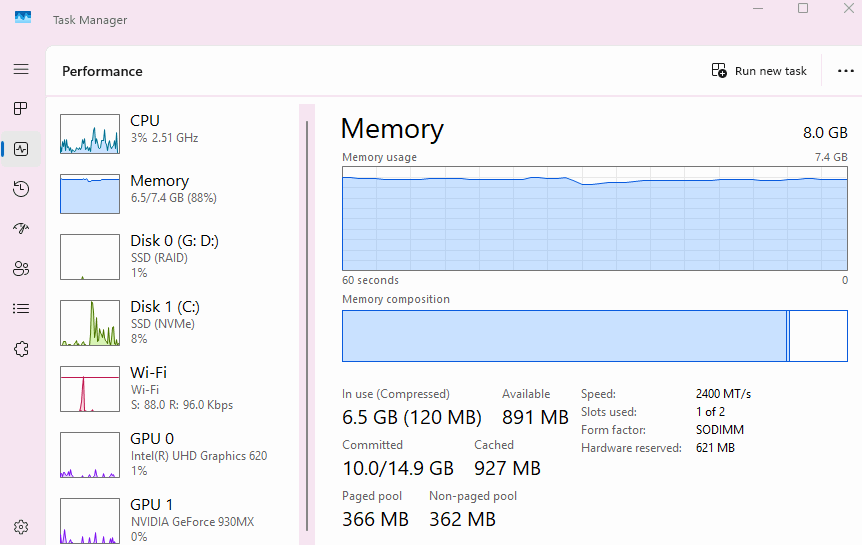
That’s with the apps just being opened and running on idle. While actually using the apps, we were often approaching 8GB.
Thankfully, Windows RAM management was smart enough to optimize the workload so that we don’t surpass the 8GB RAM limit even though we were close to it all the time. However, we have noticed that storage activity increased, especially when switching between browser tabs and apps, and that switching wasn’t that smooth. That’s likely because the OS started using SSD storage to read and write temporal data instead of much faster RAM.
16GB Laptop RAM Usage Test
Upgrading RAM from 8GB to 16GB improved the situation immediately, making the laptop use more comfortable when it comes to multi-tasking and overall use. We haven’t noticed any slowdowns while using apps or switching between them and browser tabs.
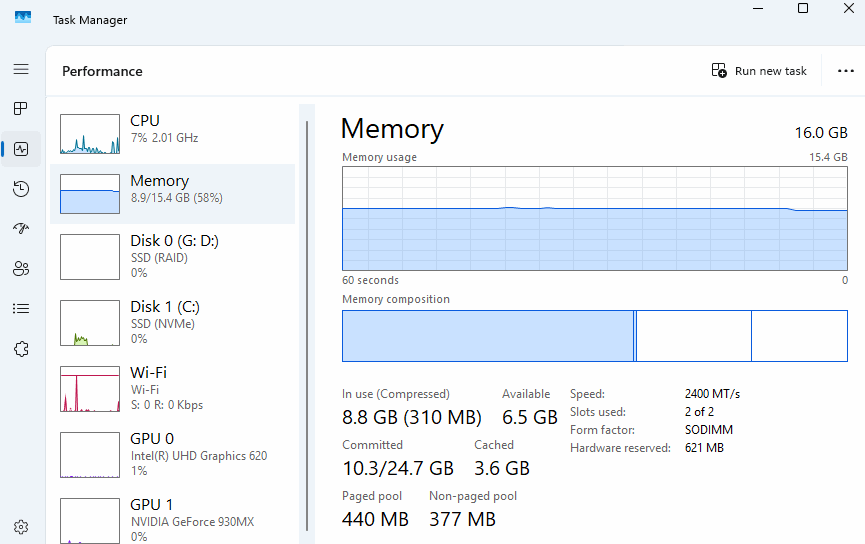
As you can see, there’s much more available RAM for additional workload than on the same laptop with 8GB.
You may also notice that in comparison to 8GB, the described workload on the 16GB configuration consumes more RAM. That’s because Windows 11 tends to use more RAM when more is available on a machine. The operating system and applications adapt their memory management to the installed capacity for better performance.
Conclusion
For years, 8GB was the “sweet spot” for value when it comes to everyday use of Windows laptop PCs. But in 2026, it’s officially the “entry-level” floor. While you can get away with 8GB for light home, office, and student tasks, 16GB is the new sweet spot for seamless multitasking.
FAQ About 8GB vs 16GB RAM in Windows 11 Laptops
8GB RAM is barely enough for everyday computing tasks on Windows 11 laptops in 2026. While you can complete light daily duties without issues, any heavier multi-tasking scenario may push you over the 8GB limit and slow down computing speed.
You will notice the difference between 8GB and 16GB of RAM only when your RAM usage – depending on the number of opened apps and browser tabsnor general memory utilization by software – exceeds 8GB. If your usage is below 8GB, the difference won’t be noticeable.
Our estimation based on laptop prices we monitor is that models with 16GB RAM are typically around $70-$100 more expensive than the same or similar laptops with 8GB RAM in 2026. Keep in mind that DDR5 memory is pricier than DDR4, so overall DDR5 laptop prices and DDR5 RAM upgrade prices are higher. The price gap between 8GB and 16GB, as well as DDR4 and DDR5, wasn’t that big prior to recent RAM shortages.
It depends on the laptop and RAM prices and laptop upgradeability whether it is smart to buy an 8GB Windows laptop and upgrade it to 16GB. If you find a really good 8GB laptop deal, it may be justifiable to buy it and additionally purchase an 8GB RAM module to add to the system.
But, keep in mind that many laptop models have soldered RAM and have no RAM slots for upgrades. Also, many models feature a single RAM slot that is already populated with an 8GB module, so you have to take it out and purchase a much pricier 16GB module in order to do the upgrade. What also affects RAM upgrade viability is the type of memory you have to buy to do the upgrade, with DDR5 being noticeably pricier than DDR4 RAM.
If your budget allows only for laptops with up to 8GB of RAM and not the pricier 16GB ones and you don’t need to use traditional Windows programs, Chromebooks are better choice than Windows 11-based laptops. That’s because ChromeOS has a smaller RAM footprint than Windows 11, which leaves more room for browser tabs and apps. Also, Android apps and games you can run on Chromebooks typically use less RAM than comparable Windows apps.
As a sidenote, although Chromebooks are generally cheaper than Windows laptops, some Chromebook (Plus) models with 8GB RAM instead of the basic 4GB may cost the same as or more than their comparable 8GB and even some 16GB Windows counterparts.
Note: Please keep in mind that this test simulated everyday use only. The recommended RAM size for a computer primarily depends on the type of programs you use and how many of them you run at the same time. Gaming, high-res video editing, coding and other intensive tasks can consume much more RAM than the everyday apps. For more info about laptop RAM in general, go to this page.