
The Intel Pentium N3520, N3530, and N3540 are entry-level processors you can often find in budget laptop and 2-in-1 PCs. The N3520, N3530, and N3540 belong to the Intel Bay Trail CPU family, characterized by basic performance and very low power consumption.
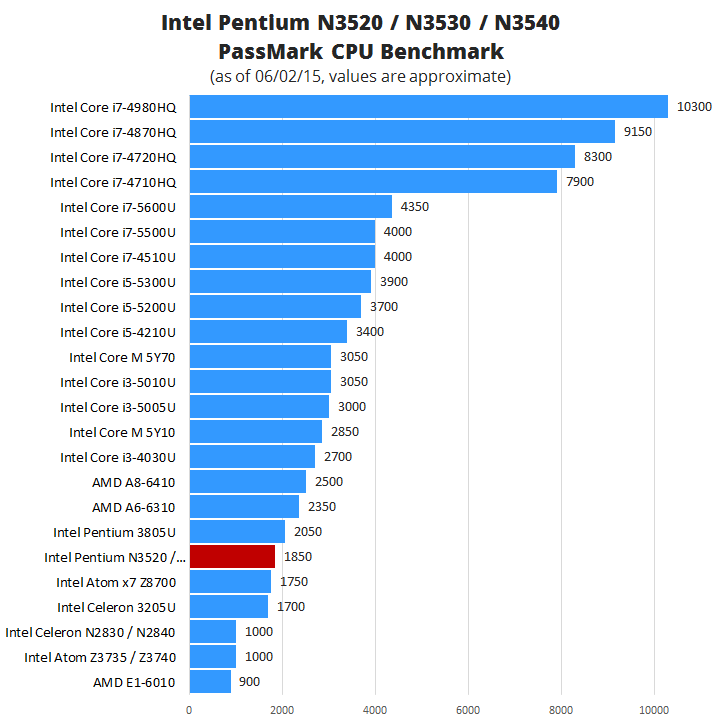
These quad-core Bay Trail Pentium CPUs deliver noticeably better computing speed than the lower-end dual-core Bay Trail N28xx-series Celerons, while consuming the same amount of power of 7.5 Watts. The reviewed Pentiums are also faster than the popular tablet-use quad-core Z37xx Bay Trail Atoms, but the latter consume only 2-2.2W. Another positive fact in favor of the Pentium N-series is that it’s only slightly slower than the 15-Watt Pentium 3805U Broadwell dual-core.
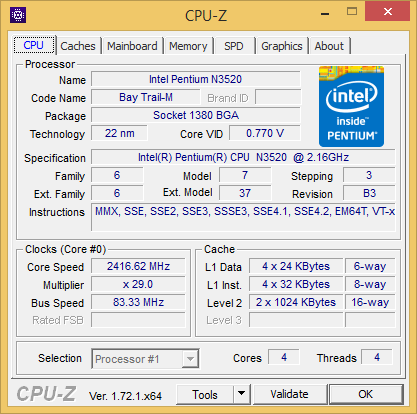
Differences between the N3520, N3530, and N3540 are minor and are related only to clock speeds. They all share the same base CPU clock speed of 2.16GHz, but in “burst” mode they can achieve up to 2.42, 2.58, and 2.66 GHz, respectively. Furthermore, the Intel HD graphics integrated in these processors has a base clock speed of 313 MHz, but their maximal dynamic frequency or burst frequency is different. The N3520 runs at up to 854MHz, while the N3530 and N3540 run at up to 896 MHz. These differences in the real world use are minor. The rest of the specifications is identical. The 64-bit quad-core CPUs based on 22-nanometer production technology have 2MB of cache, support for up to 1333MHz RAM speed, and support for VT-x virtualization.
Intel Pentium N3520 / N3530 / N3540 Real World Use Test
 For this real world-use test of the Intel Pentium N-series Bay Trail processors we used an HP Pavilion x360 11 convertible notebook with the Pentium N3520. As already mentioned, the N3530 and N3540 are only slightly faster, which can’t be noticed during your daily computing tasks or gaming. Alongside the N3520, the tested Pavilion x360 11 had 4GB of system memory at 1,333MHz which is enough for moderate multitasking and a slow 500GB hard drive spinning at 5,400 rounds per minute.
What are the Pentium N35xx chips good for? In short, for web surfing, multimedia playback, office document editing, and casual gaming. You can even use them for high-resolution photography and 1080p video editing, although some operations (applying image filters, video transcoding) in these tasks take noticeably longer time to complete than with the mainstream Intel CPUs like the i5-5200U. Webpage scrolling, tab switching, and zooming in Google Chrome worked flawlessly on the tested system. You can also play high-resolution YouTube videos (including 4K) without a glitch. Work in Microsoft Word and Excel programs was very fluid. Take a look yourself:
Gaming on Intel Pentium N3520 / N3530 / N3540
As expected, you won’t be able to play the latest hardware-demanding blockbuster game titles. But, casual games and lighter MMORPGs and first person shooters run acceptably good. For instance, you can play League of Legends and Counter Strike: Global Offensive on low settings and 720p resolution at around 30 frames per second. Dota 2 MMORPG runs mostly between 20 and 25 fps, with occasional drops in intensive scenes to around 15 fps. Minecraft runs well on low settings, at a speed of around 30 fps. FIFA 15 soccer is too heavy for the chips. You can’t get more than 15 fps consistently with them on lowest FIFA 15 detail settings and 720p. We also tested Skyrim, which scores around 15 fps with the same settings.
Temperatures
The Pentium N Bay Trail has an excellent thermal design. In the tested HP x360 11 laptop, temperatures never exceeded 51 degrees Celsius, even under 100% CPU load during benchmarks. All that with very low fan noise. On idle, CPU temp was 41 degrees.
We give the Intel Pentium N3520, N3530, and N3540 processors four stars because of their great everyday performance, low power consumption, cool operation, and low cost. Click on the Description tab above for a detailed review.
how turn on Turbo Boost on intel quad core 3540-2.16ghz to 2.66ghz???
instructions?
Will it run slime rancher at a reasonable rate
User of this processor on windows and Linux environments…Fast when you need it, works well with office software, light to medium video/photo/audio editing and some other usually work related software…Gaming(in my case using a dedicated video card on my laptop) is great for almost every game so far, crysis3, Cod(modern warfare, black ops series) Battlefield games(even battlefield 1 run, but I had some issues I think because of low memory), playing in low/medium graphics…it’s a great entry level CPU that will surprise anyone with the performance and low power consumption.
Is this HP laptop one that is being recalled because of concerns of battery fires?
can i upgrade my N5320 to i 5 processor
I have a intel pentium n3540 processor and it is brand new but seems to work slow. Like going to settings, opening web browsing and so forth navigating through the system.
Is the intel N3530 back ward compatible to intel’s pentium 4 processors? Looking to get an inexpensive external optical drive to replace the broken one in my laptop and most say compatible only with pentium 4.
i have seen dell 3147 sporting N3530 , N3540, N3700, that work excellent with no lag on everyday tasks, browsing, etc (don’t know about games as I don’t play) provided you do a clean install, and change to SSD, even celeron N2840 seems to work pretty good…the author is correct the mechanical drives really slow things down, but changing to ssd the thing flies, on these Dell 3147 you can upgrade to 8GB Ram, but doing this has less effect on speed than just doing a SSD upgrade and preferably a clean install
is there a way I can upgrade my N3540 to a better processor with the same socket?
Can I upgrade my RAM??? Here are my system details.
I have an Acer Aspire E5 511 with the Intel Pentium quad core CPU N3540 @ 2.16 GHz. It has 2 RAM slots but only one factory 1-8GB 1333 DDR3 RAM chip installed. Can I upgrade the RAM to 2 – 8GB 1600 DDR3 RAM chips?? The information on this page specifies::
Memory Support
DDR3 (1333 MHz max. speed)
Is this a suggestion or the really the max RAM speed the processor supports?
I installed the 2-8GB 1600 DDR3 RAM chips but it seemed that the BIOS didn’t recognize it…the computer ran very slow when booted.
I installed the 1-8GB 1333 DDR3 RAM chip and the laptop is working normally again…I am using it to write this question.