

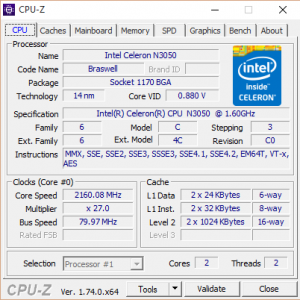
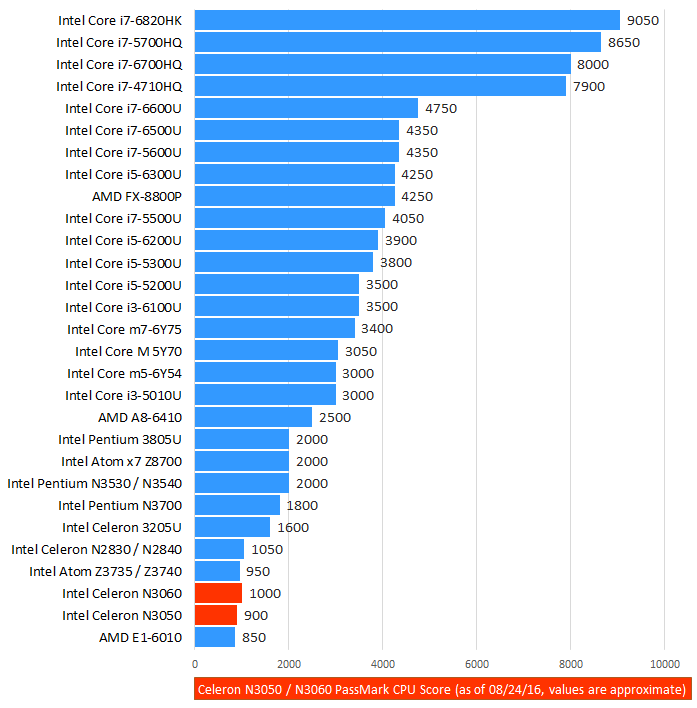
The Intel Celeron N3050 and N3060 belong to the 14-nanometer “Braswell” processor family and bottom of Intel’s laptop CPU lineup. The dual-core chips are clocked at 1.6GHz base speed. The boost speed on the N3050 goes up to 2.16GHz, while the N3060 can go up to 2.48GHz. Regardless of the clock speed differences, both chips perform similarly, with the N3060 being only a tad faster. Generally, the CPUs are suitable only for the basic home and office computing operations, very similar to the popular and older Celeron N “Bay Trail” 22-nanometer series. As same as the other Braswell parts, the Celeron N3050 and N3060 consume 6 Watts of power, as opposed to 7.5W of Bay Trail CPUs. Therefore, they are power-efficient processors and that’s their best feature besides low cost.
The chips are used in various budget notebook PCs, especially those with small displays and casings.
Intel Celeron N3050 / N3060 Benchmark
Real-World Use Test
We have tested the Celeron N3050 in an HP 15 laptop configuration with 4GB of RAM and a 500GB 5,400rpm hard drive. As noted previously, the N3060 runs only slightly faster. The difference isn’t noticeable during real-world computing activities.
As you can see in the video, the N3050 paired with 4GB of system memory can handle the daily tasks well. It provides sufficient power for running multiple web browser tabs with heavy web pages opened, Office applications, and even some photo and video editing. However, applying image adjustments and effects and video exports take some time, so the CPU definitely isn’t recommended for that type of activity on regular basis. With the current video drivers, select programs running on the N3050 had some high-definition video playback issues. For instance, playing 1080p and 4K YouTube videos VLC Media Player program and in Google Chrome web browser produces very high CPU loads and dropped video frames. On the other hand, in Microsoft Edge browser these videos run smooth with much lower CPU load.
Gaming
Also, the reviewed N3050 and its Intel HD integrated graphics struggled with running most of the popular games, even some relatively light titles. Again, future driver updates might bring improved gaming performance, but currently you can play without big lags only League of Legends and Minecraft among the blockbuster games. We have also tested Dota 2, Skyrim, and Counter Strike GO. The processor and its IGP weren’t able to achieve gameplay at above 20 fps in these games.
Temperatures were quite low, even during heavy 10-minute CPU load while converting a video file with 100% CPU utilization. The CPU temp was 46 degrees Celsius on idle and up to 57 degrees during the video conversion.
The N3050 / N3060 series has overall weak performance, but also low price, low heat, low power consumption, and fanless design capability. Based on that and other impressions described in the full review on this web page, I’ll give the N3050 / N3060 series 3 stars.
Question:
Wont the cpu perform better in real world scenarios when it is not running screen recording programs and rendering the video or running fps programs?
Is it intel celeron N3050 processor will supports MATLAB or not?if it supports what requirements are needed?
can we play dota 2 with this stuff?
I’m considering this for my 72 yr old mother who would just use it for basic stuff like FB, email, youtube, Netflix, and some other videos, photos…
does it handle Netflix/videos well?
can i play call of duty mw3 or any 3d games in intel celeron n3050?
can i play call of duty mw3 or any 3d games in intel celeron n3050 with intel hd graphics?
Do you know how i can update this driver?
I’m trying to play Runescape and the NXT client is telling me my graphics driver needs to be updated by im just confused
Is n3050 faster or slower than atom z8300 since the latter is quad core?
can i use adobe programs well with celeron?
can i swap the 3060 CPU with i5 6400 ? or they has a different slot
Can I play GTA 4 and GTA 5 On this processor??
which generation is it? some of my friends told me that its 6th generation laptop. is it true?
Is it celeron is best?
Can I use the HP N3060 for displaying images for outdoor security cameras? Will the images be clear or choppy?
is it possible to upgrade ramto 4gb or insrt ssd in dell celeron n3050
is it possible to upgrade ramto 4gb or insrt ssd in dell celeron n3050
Question:
Is celeron N3050 suitable for autocad?
Lasted for less than a year
I got this PC with the dual core version of this CPU. It started off alright but started to nose-dive pretty quickly. Low graphic games can scrape around 28 FPS, but after playing The Sims 4 it ran an average of 14 FPS. Not very good at all. I wouldn’t recommend this CPU.
No, you can not play high-quality games or use it for auto cad. It’s supposed to be a simple notebook for simple tasks, like web browsing, email, youtube videos, writing, just simple tasks. For the price, it’s not bad at all.
However, you need more memory than the standard 2 GB if you’re going to use Windows 10, and install a solid state drive to speed things up.
I personally would upgrade the memory to the max, install an SDD hard drive, and ditch windows for a lightweight Linux distribution. Windows like to gobble up RAM. A lightweight Linux Distro would cut all the fat from the OS, keeping things light on memory consumption and without unnecessary running tasks; like what windows is good for; you have plenty of RAM and processing power to get things done. You’ll have trouble with Windows 10 on this system because of the Antivirus program constantly running in the background, scanning every file. You don’t need to use an Antivirus in Linux, saving processing power and RAM.
i play fifa 18 on this processor and there’s no any problem
which adobe can’t run well on this processor ,….
I have this on a HP G5 and upgraded it with Corsair SSD and 8 gb of ram..in Windows 10 it sucks! In daily tasks it sucks, worst processor ever, sometimes I feel like smashing it, when it stutters on 1080p Youtube videos, it’s so slow is painful to watch
I bought a refurb Chromebook with the N3060 and 2Gb RAM. Yeah Chrome loads pages pretty slow with the CPU. But a positive is that if you just want to watch SD streaming and do nothing else it work OK. Even 720p works fine. But trying to surf the web with some complex web sites tries your patients in loading times. Even a basic minimalist OS like Chrome needs a faster and better CPU.
can I mine cryptos (Ethereum) in N3060
is there a chance that i can upgrade my laptop’s CPU or Ram? Intel Celeron N3060 is my CPU.
Hi, can I teach online with an intel celeron @ 1.60 GHz N3060.my laptop is HP stream 11
I have ASUS X541S, CPU Intel Dual – Core N3060, 4GB RAM, 500 GB HDD. What can be upgraded with this unit to increase performance in opening MS office applications and other applications and multiple tab web browsing? Can this be inserted with an SSD?
boas, porque esse modelo nao usa ventoinha…. nunca percebi…qualquer computador tem de ter fonte de refrigeração
Do you recommend upgrading Celelon N3050 from 4gig to 8gig ram?
Hi, can I install Ubuntu 18.04 on my HP 15 with Intel Celeron N3060 @ 1.60GHz, 2 cores, 4GB ram, 64-bit?
does the HP 250 G6 Intel(R) Celeron(R) CPU N3350 @ 1.10GHz have a second RAM slot? Product Nr 2FG08PA#ABG , I understandthe 4GB is soldered onto the board
I have an N3050 processor and 4gb ram , so I was wondering if I can upgrade my ram to 8gb if my pc only support 1 slot
I have a Lenovo laptopwith Celeron N3060, short ago, I started to have black screen when sharing screen tomultiple viewers using zoom… could this processor be the culprit of the black screens?
I’ve had this processor for 4 years and it’s speed and performance is pretty much trash when it comes to more advanced tasks and even just light gaming. However, this processor was probably only meant for users that wanted to simply browse the Web and send emails, call on Skype or Discord and other simple tasks. It gives enough speed and power to do these tasks pretty easily. It may have the slowest speeds a processor could have, but it does its job well as being a processor meant for basic and simple tasks. I rate this 4/5.
I have intel celeronn3060@1.60 ghz. And 2 GB RAM. It’s extremely slow. Even i can’t browse the internet.
Can one play PubG on a CPU N3050 @ 1.6GHz w/8.00GB RAM?
Can I increase the processor speed of celeron N3060 1.6Ghz if I add another 4 GB ram to my laptop
Can these processors run with passive cooling? is it bad to use one?
Can Intel Celeron N3060 editing a video?
pregunta me gustaria saber si le puedo cambiar el Processor: Intel(R) Celeron(R) CPU N3050 @ 1.60GHz (2 CPUs), ~1.6GHz a mi laptop y cual seria compatible????
I have installed ubuntu 22 on proline n3060 and it is failing to find the wifi adapter. Any help
Can intel N3060 run solidworks?