
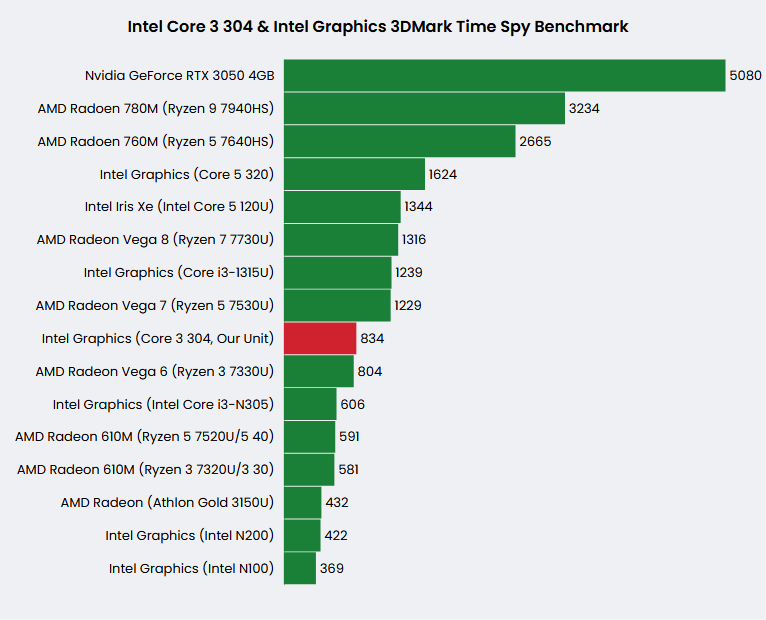
Graphics performance of the 2026 ‘Wildcat Lake’ Intel Core 3 304 lower-end CPU for laptops and its integrated Intel Graphics is an interesting one, since it runs in single-channel RAM mode only. That’s bad for 3D graphics & gaming, but the Core 3 304 with its IGP actually delivers some acceptable speed for the class as you can see in this 3D Mark Time Spy score screenshot and accompanying comparison chart against some relevant laptop chips.
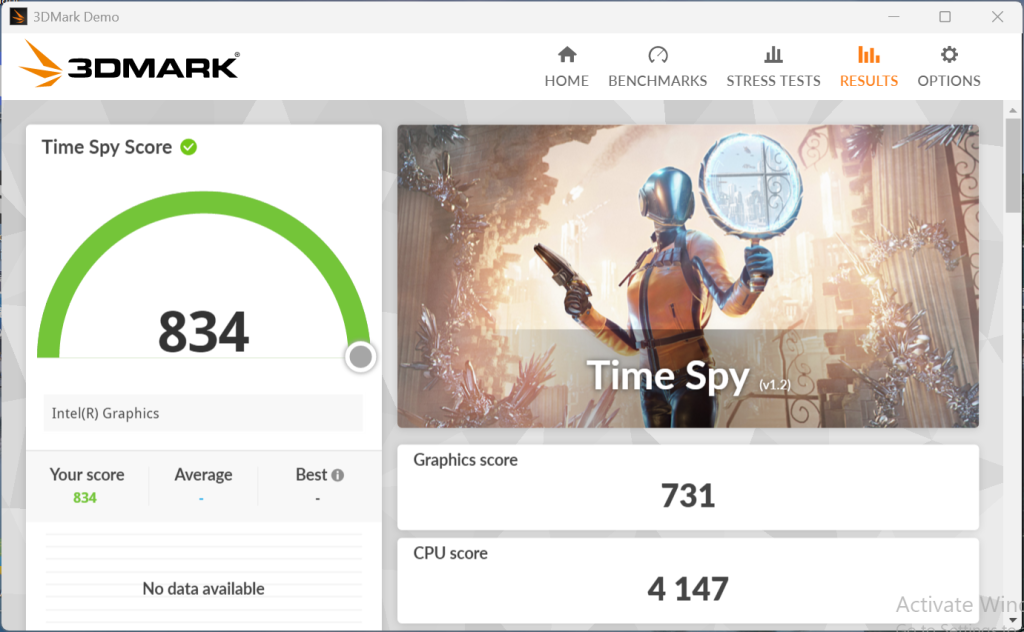
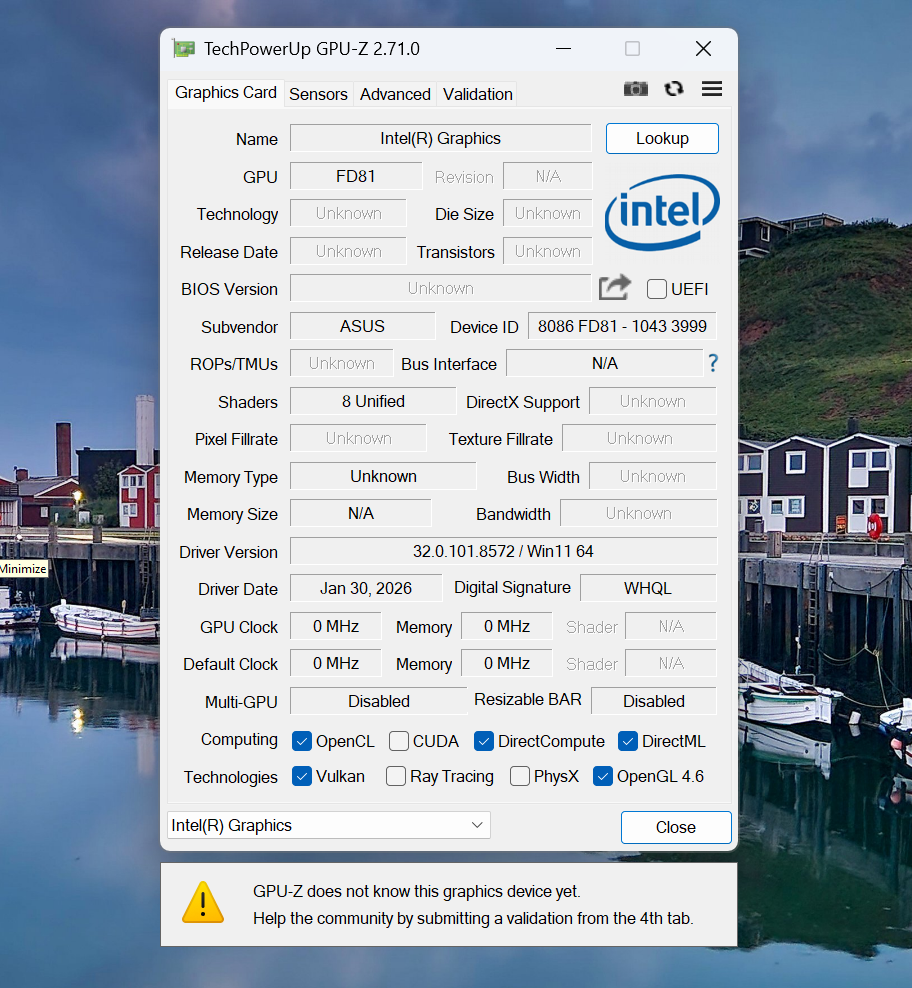
Our test unit was an Asus Vivobook X1504MA laptop configuration with 8GB of single-channel RAM at 5600MT/s and an NVMe SSD, besides the Core 3 304 with single-Xe3-core Intel Graphics. These same basic specs can be found in other budget laptop models, such as the HP OmniBook 3 or Lenovo IdeaPad 3i.
You can expect similar performance from the Intel Core 3 305 CPU variant, which has the same single-core graphics processor. But they are nowhere near the Intel Core 5 from the same family, such as the Core 5 320 / 330. No wonder because they have 2 x Xe3 graphics cores while still running in single-channel RAM mode only.
Check out laptops and mini PCs with the Intel Core 3 304 on Amazon.com (ad).
Obviously what helps a lot with not-so-bad 3D Mark score of the Core 3 304 & Intel Graphics is that it has relatively high graphics clock speed of 2.3GHz. For comparison, Intel Graphics of the older Core i3-N305 counterpart runs at 1.25GHz. And the single-channel RAM only Core 3 304 beats the dual-channel AMD’s Ryzen 3 7320U / Ryzen 3 30 counterpart with the Radeon 610M graphics by a large margin.
What’s disappointing about the Core 3 304 is that the 2023 13th Gen Intel Core i3-1315U scores way better although having older iGPU running at 1.25GHz. But, the i3-1315U supports dual-channel RAM so the effect of it is again confirmed as very important, especially for iGPUs.
However, it’s worth noting that this is a synthetic benchmark and that the real-life gaming performance may vary depending on a particular game.
Intel Graphics of Core 3 304 Gameplay Benchmark Videos
To give you an idea about how the tested Intel Graphics of the Core 3 304 CPU performs in games, we made videos playing some of the popular game titles, like Minecraft, Roblox, and League of Legends.
Minecraft
Let’s take a look at the vanilla Minecraft helped by Sodium mod for better performance. With default graphics settings and Full HD resolution we got a quite fluid gameplay with average fps of above 80, as you can see in the video:
Introducing 3rd party shaders made Minecraft beautiful, but the frame rates were very low, basically unplayable. The average fps dropped to only 20.
Roblox
Roblox run expectedly well, because it is a light game. With graphics details maxed out on FHD resolution, we got above 40 fps. Not too much, but there’s a room for fps improvement by reducing graphics quality.
Fortnite
We thought the Intel Core 3 304 and its IGP would struggle with Fortnite a lot even on lowest “Performance” settings and low 720p resolution, but that wasn’t the case. True, 60 – 65 fps may be too low for hard-core players, but for casual gameplay it looks quite good.
We have also tried to use Intel’s XeSS AI upscaling, but the result wasn’t good. Switching from Performance to DX12 setting to enable XeSS and using the medium XeSS scaling quality resulted in somewhat blurry image in our opinion and there was no fps increase. Contrary, it dropped to around 50 fps. So the regular Performance setting was a better option.
League of Legends
League of Legends players may find the Core 3 and its Intel graphics very good with average fps around 70 on the highest graphics settings. That gives a headroom for further fps improvement by lowering graphics quality. What we didn’t like is that the usage of the main processor cores during LoL gameplay was peaking close to 100% at some moments.
Rocket League
Rocket League runs nicely on Full HD resolution and Quality settings, with around 50 fps on average. Reducing settings to Performance added a few fps more.
Conclusion
Overall, the Intel Core 3 304 with Intel Graphics delivered playable experience in these very popular games. It may be surprising to some the very basic Intel Graphics of the basic Core 3 series CPUs can handle them acceptably. That’s of course for casual non-professional gamers that don’t necessarily need the highest fps counts.
1 thought on “Intel Graphics of Intel Core 3 304 (Gaming Review)”