
The AMD E2-9000e is a budget-class laptop processor (CPU). You can find it in various affordable notebook models. The E2-9000e is a dual-core chip with clock speed of up to 2 GHz and 1MB of cache. These modest specs mean the CPU can deliver basic computing performance, which is suitable only for non-demanding PC tasks like web browsing with small number of browser tabs running simultaneously, light work in MS Office apps, or video / audio playback. The chip is not suitable for heavier duties like content creation. On the positive side, the E2-9000e has a power consumption of only 6 Watts, meaning that it is battery life friendly.
AMD E2-9000e Benchmark
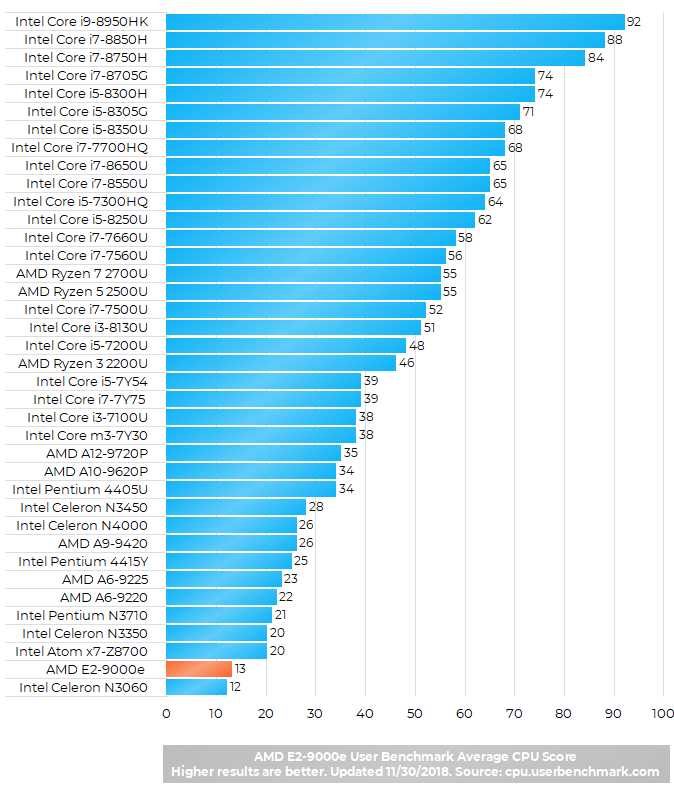
As expected, User Benchmark CPU test puts the AMD E2-9000e near the bottom of the CPU score list. However, the E2 is slightly faster than its direct competitor by Intel – the Celeron N3350.
As for gaming, the included AMD Radeon R2 integrated graphics is able to run many of the popular (but light) game titles, as you can see in the video playlist below:
Well its certainly pathetically slow chip. Battery life isn’t going to fix the terrible experience using this chip. Dell is using this chip in cheap 11″ 3000 series replacing the Celeron 3060 but its not a big improvement for sure.
This processor struggles to get anything done. Whether you’re simply just browsing websites or using Microsoft Word for your work, it’s not worth it. Absolutely horrible and not worth the purchase. From my personal experience, the processor is just about enough to run Windows 10 but anything else, no.
AMD E2-9000e is a medium performance prossesor it is same to intel core i3 you can play games in 25-35 Fps but it is really a good prossesor for medium gaming performance. you should delete useless files. you should update your graphics card and prossesor drivers for better gaming performance.and you can play GTA IV pretty good (medium-low)20-25 fps.in it
I got to try this processor on HP 14-CM00095AU, and I was astonished on how BAD this processor is. I even tried to update amd drive in hpe that the processor will have better performance to no avail.
I suggest anyone already bought laptop with this processor to buy good SSD (WD Blue, Samsung 860, etc) to complement this super slow processor.
Awful…. just awful. You can’t even open outlook without it hanging. I don’t think I had a computer this slow even back in the 90s.
This is by far the slowest most frustrating and pathetic computer I have ever owned. Can’t believe Best Buy would even carry it. I bought it in an emergency and did not check the reviews… BIG MISTAKE. It takes exactly 37 second from hitting the Chrome Icon to actually getting a web page. I swear I would put my 1985 Commodore 64 against it for a processor speed battle and my money’s on the Commodore.
Can I upgrade it to any other processor
this computer cannot even play the theme song from the Everybody Up iTool from Oxford University Press. As I use 8 computers this is all I bought the thing for and I am shocked.
Awful, further marred on HP 245 G7 by the fact that SATA-3 Disk runs on SATA-2 interface, SSD does NOT IMPROVE ANYTHING, but it is a useful door stop, albeit expensive,
what is the price AMD E2-9000e Radeon
Laptop
Can I upgrade AMD E2 -9000E PROCESSOR to AMD Ryzen 3 3200G PROCESSOR
Can I start programming and creating websites like html and css with this laptop?
This is the worst computer I have ever used, it is slower than a snail and a turtle put together, it SUCKS at gaming and even watching an HD video freezes and lasts for almost 30 seconds, it can’t support Zoom and google and that is extremely disappointing and frustrating.
In conclusion a lousy computer and if you wanted to buy it, you’d better get another one.
how can i improve the performance of this AMD E2 9000e processor and what kind of games can be played in such pcs
can i run fifa 18 on this processor with 4 gb ram
Can I upgrade from AMD E2-9000e to ryzen 3?
I want to take this computer to the bin
PLEASE WHICH PROCESSOR IS CLOSE IN SPECIFICATION TO AMD E2 9000E RADEON R2
Well I gotta say it was worth the price which was not alot compared to a few of the machines I use to own.
Not bad. My wife uses it basically to type, watch movies and listen to music. I was able to get Call of Duty MW3 to work. If you tweak the graphics settings properly, it actually works. My advice is if you have a laptop like this, get rid off any junk that could possibly chew up your RAM and processing speed. Not recommended for intense gaming or graphics work. But, if you’re looking for a machine to perform basic tasks, this is it.
What could be the cost of AMD Processor E2-9000e radeon r2
Can I connect PC to this Lenovo laptop to improve his externally Processor and his RAM and performance.
I can upgrade RAM of this Lenovo IdeaPad 320 laptop and how many price will take to upgrade the eam