
The Intel UHD Graphics is a graphics processor integrated into select Intel Core processors for laptops. More precisely, in the 10th Gen Intel Core U-series processors, such as the i3-10110U, i5-10210U, and i7-10510U. The UHD isn’t designed for hard core gaming. It rather provides basic performance for managing the notebooks’ screens and some light gaming.
Intel UHD is very similar to its precursor – the Intel UHD 620 of the 8th Gen Intel Core U-series processors. They have 24 graphics execution units. Intel has also in its main processor lineup the 10th Gen Intel Core G-series chips, with improved integrated graphics processors – the Intel UHD (G1) with 32, Intel Iris Plus (G4) with 48, and Intel Iris Plus (G7) with 64 execution units. These graphics processors offer somewhat better performance, but still in the low-end graphics range.
Intel UHD Graphics Benchmark
Here’s the User Benchmark ranking of the UHD integrated graphics of the 10th Gen Intel Core U-series processors, compared to other popular laptop-use GPUs.
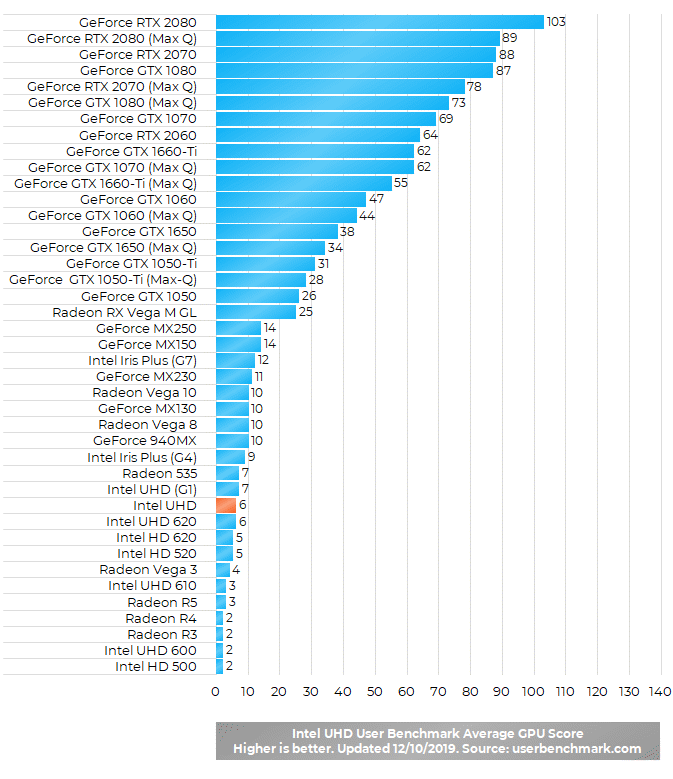
As you can see, the Intel UHD graphics is near the bottom of the benchmark chart. That’s quite expected, since graphics processing units that are built into the systems’ main processors are generally weak. The Intel UHD can be described as an average integrated graphics processor. Also, it is somewhat slower than the Intel UHD G1 and Intel Iris Plus G4 / G7 GPUs.
Real World Gaming
Just like its Intel UHD 620 similarly-specced precursor, the Intel UHD should be able to run decently smooth many of the most popular games. In particular, lighter titles such as League of Legends, Minecraft, or Dota. It isn’t a gaming-class graphics solution with potential to run smoothly all the latest AAA games, but it can be a very decent budget graphics choice for light gaming with great power efficiency and cool operation.
Take a look at the gameplay videos provided by the YouTube community in the Reviews, Q&A, and Videos section below.
Is it suitable for all the works like ,office work,designing,rendering etc except gaming ?
Hi, it isn’t good for heavy graphics work like 3D rendering and applications that rely on graphics performance a lot. It is a very basic graphics processor. For these tasks, I would suggest a dedicated video card, such as the Nvidia GeForce GTX series, preferably GTX 1650 or higher. The Intel UHD is good for tasks that are easy on the graphics, such as Office apps, web browsing, or design and other graphics programs that don’t rely a lot on graphics power.
Will this be enough in photo editing like photoshop or lightroom? The specific laptop is HP ENVY 13-aq1000nx, Intel Core i5-10210U (10th Gen), Intel UHD Graphics, 512 GB PCIe NVMe M.2 SSD.
Hi, I’m not a Photoshop / Lightroom user, but can tell you for sure the main processor (CPU) is more important for these programs than the graphics processor (GPU). The Core i5-10210U is a very good processor for these tasks. I’m currently using the previous 8th Gen Core i5 with its UHD graphics for picture editing in Paint.net and Nikon’s RAW editor and the processor works great. The 10th Gen i5 is even better. That said, the Intel UHD integrated graphics of the Core i5 is a basic graphics processor. As far as I know, some features of current Photoshop and Lightroom versions can utilize the graphics processor to make these features run faster. For these features, having a better graphics processor like a dedicated video card (Nvidia GTX, RTX…) is beneficial (and maybe a must for some advanced Photoshop features). Otherwise, the i5-10210U / Intel UHD combination is a good choice for image editing. Just make sure you have at least 8GB RAM.
Hello, can I train CNN on this laptop, it has mentioned in this link: https://laptoping.com/cpus/product/intel-core-i5-1035g1/
that as it is upgraded for 10th generation therefore it could perform deep learning and AI computations
How does this GPU performs in games like GTA V, FIFA 19, CoD, Fortnite, etc. Can anyone share a gameplay video showing the fps count?
Does it supports 4k monitor?
Yes, it does. But, keep in mind that if your laptop has only older HDMI version 1.4 output, maximal refresh rate of the screen at 4K resolution will be 24 Hz, as opposed to common 60 Hz you can have via HDMI 2.0 or DisplayPort output.
does intel UHD support games like Call of Duty modern warfare of warzone?
Laptop ACER Aspire3 intel core i5 10th GEN with UHD graphics. My significant other just bought this laptop for school as it turns out he needs to be able to run a program called Mastercam Design 2021. It needs to have OpenCL 1.2 to operate the app for school labs correctly. I have tried to update the drivers and run all possible available system updates in hopes it would resolve the issue, but i am still getting the error message that this compatibility hasn’t been resolved. What can i do to upgrade the graphics we do not have the money to just go out and buy another computer like he wants to do. (he should of listened to me to begin with and we would not be having this problem)
Does it support for streaming HDR in Netflix?
Hi, HDR 10 used by Netflix is supported on integrated graphics of Intel processors since the 7th Gen Intel Core (this Intel UHD is of the 10th Gen Intel Core). But you will of course need a display with HDR 10 support, be it the laptop’s display or an external HDR 10-ready monitor. Please keep in mind that besides the HDR 10-ready graphics processor, additional chipset built into the laptop may be needed to stream HDR 10 video over HDMI video output. As far as I know, HDR 10 is supported on DisplayPort video outputs by default.
Can Intel UHD decode H.265?
If i upgrade my ram to 12 GB then intel uhd graphics can access maximum 6 gb. I know i shouldn’t give access to more than 2 gb. But how good it wil perform if I dedicate 2 gb of ram as video memory?
I’m talking about lenovo s340 and S540 series
S340 comes with i5 G1 processor and s540 comes with i5 U processor. Which one perform better for video editing and animation? Both comes with Nvidia MX250 graphics.
Does it support Asphalt 9 Legends?
I need to run Giza 2020 autocad. They specify a “Graphics Card: DirectX 11 compliant windows dedicated graphics card with 4GB of video memory” Will the Intel UHD graphics card meet these requirements?
1.Does it support for Display Stream Compression?
2.Does it support 4K2K 120Hz?
can i play gta 5 i have inten uhd graphics and i5 10gen 8gb ram
Can the Integrated Intel® UHD Graphics run on Autocad?
Hi Issac. I’m no expert, but I do use this for work. I have AutoCad LT 2021 w/8 GB of memory. However, my system only can go for a few hours of work before I experience freezing. The only way to make this stop is to restart the computer. I’m hoping my employer will soon beef up my system so I can have a better working experience. Not sure if just increasing the RAM will do the trick. I only work in 2D as well. Just gets frustrating when editing text on a dwg and it freezes for 15 or 20 seconds.
Could i ru phasmophobia with this?
can I connect 2 external monitors to this?
How increase vram on intel uhd g1 ?
Is there is a point in like i5 or these better graphic cards, if you dont intend to game. If you only do office tasks, youtube and stuff like that. Is there an actual difference, is it worth to buy a budget gaming laptop just to have better processor and graphics card ?
Hi, I wouldn’t buy a gaming laptop only for office tasks, videos, web browsing and similar. In fact, gaming laptops tend to consume more power – therefore they have shorter battery life – and produce more heat. And you’ll hardly notice any performance difference between gaming and regular laptops in the usual day-to-day tasks you mentioned.
Can I play sims 4 with these graphics?
Can HDMI and DP be used at the same time to drive 2 QHD displays each with resolution of 2560 *1440?
i am using HP 14s laptop. after turning on the system, part of the screen goes into black for some softwares. This issue get resolved when I disable and enable the graphics driver.
Does it support valorant
My laptop hp core i3 1005g1 Intel uhd graphic doesn’t support medium graphics for pes 16 and it shows doesn’t meet the minimum requirements of 512 mb vram. Can I increase it?
Does Dota 2 run smoothly with this GPU on i7-10510U 16 GB RAM ?
Hey, is it good for 3d modeling softwares like pixi4dmappe4 nd 3dreshaper?
Can I watch 4K movies through HDMI into tv?
Yes, you can. However, some laptops with the Intel UHD and other graphics processors aren’t able to deliver 60Hz or higher refresh rates while displaying 4K content via HDMI, as opposed to DisplayPort which supports 4K at 60Hz. 4K videos at 24Hz refresh rate should work smoothly via HDMI.
Is it possible to play genshin impact with these graphics?
There are multiple videos on YouTube showing that Genshin can run on the older Intel UHD 620, which performs very similar to this Intel UHD graphics. In all of these videos graphics settings and resolutions are set to low and frame rates are in the lower range, but playable. Some videos however show freezing issues, which can be fixed with tweaks.
I have a dell vostro 3590 i3 10th gen 4 gb ram. It has intel uhd graphics 620. What is the boost clock speed of the graphics card?
On the 10th Gen i3 U, the Intel UHD Graphics has maximal boost clock of 1 GHz. It’s a bit slower than on the i5 and i7 (1.1 and 1.15 GHz).
I’m a gamer myself, i downloaded valorant one time and played the tutorial and its really bad, it lags, i tried to lower the settings and tinkered it a bit but it isn’t really working. Can i ask what other games can i play with this kind of graphics aside from League of Legends and Overwatch? My laptop is Asus X415 X415EA-BV336T with Intel Core i3-1115G4 and Intel® UHD Graphics.
How can I update UHD graphics driver? I couldn’t find any way to update it.
I understand this is from 2019, but there should be an updated driver for 2020, or 2021. I cannot run Adobe Premiere, because it isn’t updated 🙁 pls, help!
The easiest way is to go to Windows Device Manager / Display Adapters / Intel UHD Graphics – right click on it -Update Driver.
Hey guys. I was wondering about my pc specs. I was running The witcher 1 with UHD graphics and runs pretty smoth, even in max resolution. The problem is that almost ever that i reach 1 hour gameplay, game crash and send me back to the desktop. All of this has to do with my integrated graphics? how is possible game runs perfect for one hour and, when happens some ramdon cutscene, it crash?
How many total displays (includes the laptop display) can the Intel UHD support?
can my laptop with a specs of i3 11th gen 8gb ram intel uhd grpahics run minecraft?
Does somebody know how to increase dedicated memory video? Because it only seems to stay in 128 mb I already try to increase it in the bios but there isnt any option to do so
Should upgrade my ram if I have I i3 10th gen processor with this graphics card or it is not worth
can the intel uhd graphics run fifa 23?
I have a i3-1005G1 8gb ram 256 ssd and the uhd for 10th gen. I can’t run valorant smoothly even at the lowest settings and also the resolution quality reduced to 80. I get 30 fos with too many stutters. Other websites say that valorant should run on my laptop at lowest settings without stutters. How is this possible ?
Can I play NBA 2k22 on my Core i3 1011.. with Intel UHD??
Do you have single or dual channel RAM – 1 x 8GB or 2 x 4GB? Single channel RAM impacts negatively gaming performance a lot on integrated graphics.
Hi all,
Please is here somebody who can help me with my question: Can I use my laptop with 3 external monitors?
Laptop:
“HP EliteBook 840 G7, IntelCore i5-10310U CPU @ 1.7 GHz [8 CPUs], ~2.2GHz”, and 16GB RAM.
https://support.hp.com/lv-en/document/c06680927#AbT7
with the standard incorporated graphics: “Intel UHD Graphics”
On the page “ark.intel.com” in section “Processor Graphics” it says “# of Displays Supported = 3”
https://ark.intel.com/content/www/us/en/ark/products/201892/intel-core-i510310u-processor-6m-cache-up-to-4-40-ghz.html
does it mean I can use it with 3 external monitors (Philips 243S) on resolution 1920×1080 ??? What do you think???
With a HUB which has 3 HDMI slots and a cable to laptop with USB-C. I didn’t buy it yet as I need to know whether my laptop would even work with 3 monitors.
The number of displays supported for a laptop processor on the Intel site usually includes the laptop’s own display, so this probably means you can use the built-in display combined with 2 external monitors.
can i run gta v on i3 10 gen 4gb ram and intel uhd graphics?
Hi,
I am considering buying out my old work computer. Its a Lenovo Thinkpad T14s Gen1 with 16GB RAM and an Intel(R) UHD Graphics Family. Will I be able to run Civ VI on this, or should I just drop buying it out? Havent played on a computer in years, so its all foreign for me now 🙂 Thanks