
The Intel UHD 620 Graphics is used in the widely adopted 8th Generation Intel Core U-series laptop processors. Specs-wise, the Intel UHD 620 is nearly identical to the previous HD 620 of the 7th Gen Core U. The new version has only 100 MHz higher clock speed as the main difference. Both of these basic integrated graphics processors are suitable for some entry-level casual gaming and multimedia, including Ultra High-Definition videos.
However, our test of the UHD 620 integrated in the popular 8th Gen Intel Core i5-8250U quad-core processor showed some noticeable performance improvements in some games when compared to our previous test of the i5-7200U dual-core / HD 620. In particular, in DOTA 2, GTA 5, and FIFA 2018. These improvements are rather a result of faster performance of the 8th Gen Core CPUs in general and other factors (like faster RAM, more optimized software and drivers) than speed of the graphics processor itself.
As a side note, the UHD 620 can be found in other 8th Gen chips, such as the i7-8550U. It’s marginally faster than the i5-8250U. Graphics performance of both is very similar, with a slight advantage of the i7 variant.
For gaming benchmarks of the UHD 620, we used an HP ProBook 470 G5 laptop with the Intel Core i5-8250U processor, 16GB of dual-channel DDR4 2,400MHz RAM, a 256GB solid state drive, and Windows 10 Home operating system with the latest Intel graphics drivers installed. Please note that on laptops with single-channel system memory (i.e. a single 16GB RAM module as opposed to 2x8GB), performance is noticeably weaker.
Note: This review is written simply, to make it easily understood by the average home & office user. If you need some of the more technical details of the test, feel free to ask for that in the Q & A section of this page.
Intel UHD 620 Benchmark
Here’s the User Benchmark ranking of the UHD 620 compared to other popular notebook GPUs:
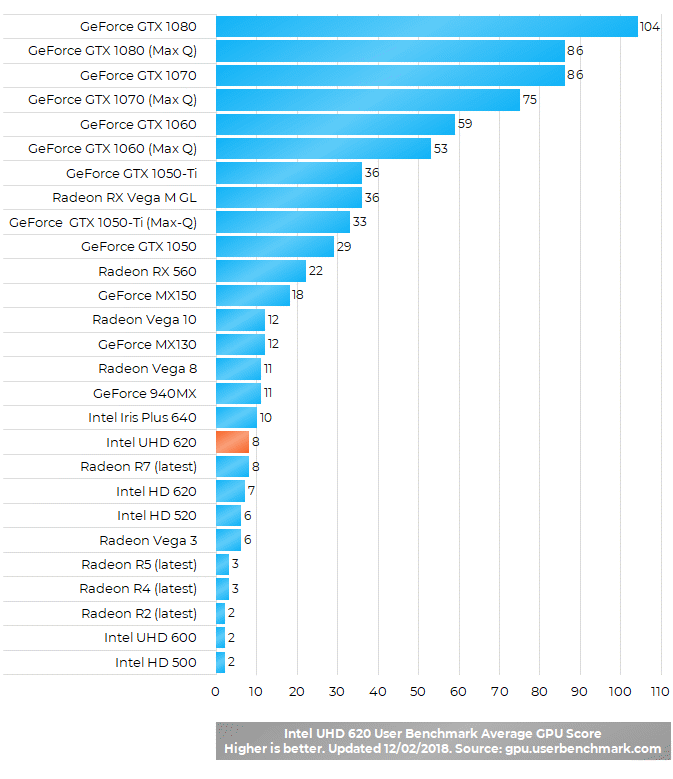
Please keep in mind that the results displayed in the chart are approximate averages across various laptop models. Graphics performance can vary depending on a laptop, its processor, RAM, and other factors. But generally, these benchmark results are good indicators of performance differences between the tested GPUs.
Game Tests
Our selection of PC games for this review includes some of the most popular titles at the time of this writing – League of Legends, Dota 2, Minecraft, Counter Strike – Global Offensive, GTA 5, FIFA 2018, Fortnite, and Realm Royale. Most of these are non-demanding games, usually played on laptops with basic integrated graphics processors. Playing the latest blockbuster titles with spectacular graphics requires a laptop with a full-blown dedicated video card.
Let’s dive in.
League of Legends is the most popular MMORPG game and probably the most popular PC game in general. A laptop with Intel’s UHD 620 graphics can easily run League of Legends. On our test laptop with maxed out in-game graphics detail settings and Full HD (1920×1080) resolution, we got between 60 and 80 frames per second. That’s a very smooth gaming experience.
DOTA 2 is a similar game, but with higher hardware demands. The optimal settings appear to be HD (1280×720 or similar) resolution and lower-mid game rendering quality. In that case, frame rates are between smooth 50 and 80 fps. If you want to have above 50 fps on Full HD resolution, you have to put rendering quality on the lowest settings.
As a CPU-dependent game, it looks like DOTA 2 takes advantage of the new 8th Gen Intel Core chips. On the previous 7th Gen Core with HD 620 graphics, we had for instance to use the lowest settings and HD for frame rates above 50 fps.
As for Minecraft, the Intel UHD 620 can easily crunch it with very high frame rates, hoovering around 100 fps. And all that with graphics details set to maximum (and default rendering distance of 12 chunks).
The traditionally most popular first person shooter game Counter Strike – Global Offensive ran very well on the tested laptop. With resolution set to HD 1280×720 and graphics on high, frame rates were mostly between 50 and 70 fps, resulting in a smooth gameplay. For smoothness on higher Full HD 1920×1080 resolution, you have to dial down graphics settings to medium. With that configuration, you can get a gameplay with mostly between 40 and 50 fps, which is again decently smooth. Improving graphics detail quality with anti-aliasing will degrade frame rates up to 50 percent.
GTA 5 is another game which saw noticeable improvement from 7th Gen / HD 620 to 8th Gen / UHD 620 update. We can’t definitely tell what enabled higher frame rates we achieved in this review in comparison to our review of the previous generation. But on a laptop with the i5-8250U and UHD 620, you can expect GTA 5 to be playable (versus previously barely playable). GTA 5 is a demanding game for the mainstream non-gaming laptops. On UHD 620, GTA 5 requires all settings to be on the lowest and low HD resolution for playable experience of 25-30 fps (and even well above 30 fps in some parts of the game).
Another game that works noticeably better on the 8th Gen Intel i5 / UHD 620 than on 7th Gen Intel i5 / HD 620 is FIFA soccer simulation. The latest FIFA 2018 can be played reasonably smooth on the lowest settings and HD resolution, with frame rates around 40 fps most of the time. That’s better than around 30 fps on the older i5 / HD 620.
Fortnite: Battle Royale is a big hit and currently one of the most popular “sandbox survival” games. We tested Fortnite: Battle Royale and found that you can play the game on the UHD 620 if you use lowest graphics detail settings and 1280×720 resolution. Frame rates vary greatly depending on a scene, ranging from around 30 – 50 fps. If you put detail settings on medium, frame rates drop to around 20-30 fps. Still playable, but choppy.
Realm Royale is an emerging game similar to Fortnite: Battle Royale, but it is more laptop-friendly. On the lowest settings (named “High” in the game) and 720p, the UHD 620 can achieve smooth gameplay at around 60fps. You can also put it on high “Maximum” settings and still have a fluid ~40-50 fps gameplay. The game is even playable on “Maximum” and 1080p resolution (around 30-40 fps), but turning anti-aliasing on severely reduces frame rates on all settings.
Conclusion
As you can see, the Intel UHD 620 can play very well many of the most popular games. Sure, a dedicated video card is still needed for fluid playing of the latest hardware demanding titles with graphics quality set on high. But, the UHD 620 which is embedded in every 8th Gen Intel Core U processor doesn’t increase overall price of a laptop, doesn’t produce excessive heat, and doesn’t consume battery much, as opposed to dedicated video cards.
which graphics card is having greater quality
Here are some of the latest popular video cards, which are better than the UHD 620 (from lowest to highest quality):
Nvidia GeForce MX150, GTX 1050, GTX 1050 Ti, GTX 1060, GTX 1070, GTX 1080
Every of these cards is noticeably better, although the MX150 is for example considered to be an entry-level card. That’s because the UHD 620 is a very basic graphics solution. The GeForce GTX 1050 and above are way better, but they consume noticeably more battery power.
Can Intel UHD 620 graphics is used to run ANSYS and Solidworks?
I’m not an expert for ANSYS and Solidworks, but I know dedicated video cards are recommended for both programs. The UHD 620 integrated graphics is much weaker for 3D applications than any mid-range or higher-end dedicated video card. From my research I have learned that ANSYS and Solidworks will be able to run on the Intel UHD 620, but parts of the programs that rely on graphics rendering will be slow. Such as rotate, zoom, pan and other actions in 3D model viewing.
Elitebook 840 g5 i7-8550u 16 ram 14 inch 4k configuration:
For simple 4k playback say from Netflix on a 27 inch 4k monitor, would it be sufficient?
For running dual 4k monitor in an typical office setting, no gaming, no video rendering, just approx 10 different applications running, excel, outlook, couple RDP, local clients, Snagit, misc applications, would it do well?
Yes, the i7-8550U & UHD 620 can easily run 4K videos, including 4K at 60Hz. Do you know if the USB-C port on that EliteBook model has video output capability? If it says it’s Thunberbolt 3-compatible in the specs sheet then it can output video as well, including 4K at 60Hz. Besides that, there’s only an HDMI 1.4 port for video output on the 840 G5 as far as I know and according to the specs sheet on HP’s site. HDMI 1.4 can also output 4K, but only at 24 Hz, so moves on the screen won’t be as smooth as on 4K 60Hz (assuming your 4K monitor supports 60Hz, if its 24 Hz there will be no difference). So, yes, if your configuration has Thunderbolt 3, you will be able to connect and run two 4K monitors, but the HDMI 1.4 port doesn’t support 60Hz.
Very helpful!
Great review Z. May I pick your brains for a moment?
UHD 620 with Core i5 8250U. Would it get me through basic Photoshop, Illustrator, Android Studio while keeping a few browser tabs open? I should mention that the laptop I’m looking at has SSD, if that makes a difference.
The Core i5-8250U is an excellent processor and it’s a good solution for Photoshop, Illustrator, and Android Studio. However, a better graphics processor (such as the Nvidia GeForce MX150, 1050, 1060 etc.) instead of the basic UHD 620 can improve speed of some Photoshop and Illustrator features that use GPU acceleration. As for Android Studio, the GPU isn’t that important, unless you make apps with 2D/3D rendering (i.e. games). In that case a dedicated graphics card is recommended.
But overall, the Core i5 8250U is among the best laptop processors in general and for the programs you mentioned.
https://laptoping.com/cpus/product/intel-core-i5-8250u/
Will UHD 620 coupled with a quad core i7 run Magix Video editor, at enthusiast / youtube level?
Can a laptop with i5-8520u processor and UHD620 graphics support multiple displays without any additional hardware/docks etc? Thanks,
It depends on a laptop. If you have two video outputs – such as HDMI and mini DisplayPort, then you can hook up the laptop to two displays (which have to have compatible HDMI / DP connectors). And at the same time you can use the notebook’s screen.
Can I play PubG with using intel UHD 620 in my laptop ?
I need to buy a laptop for my engineering student and am considering a laptop with an intel uhd 620 graphics. Will this work for Solid works, 3D printing? Do you have any thoughts on the best system.
I have a Toshiba l750 i5 core and I would like to have a better image on my tv when playing a dvd. would up grading to a uhd 620 from factory drive improve the quality ?
hyy im rakshith,i has i7-8550u,12gb ddr4 ram,full hd display,uhd 620 integrated graphics,my question is can i run gta 5 smoothly on my lappy
Hi, Rakshith. There’s a video above on this page with GTA 5 running on the i5-8250U & Intel UHD 620. The i7-8550U & Intel UHD 620 is only a tad faster. You’ll be able to run GTA 5 on the lowest graphics settings and 720p HD resolution at around 25-30 fps most of the time. So, it won’t be smooth, but it will be playable on the lowest settings.
Hello, would this be able to run a Photoshop, illustrator program with no glitching?
I have been using Photoshop on a laptop with the Intel i5-8250U and basic Intel UHD 620 graphics (without a dedicated video card). Everything worked completely smooth for some basic editing of DSLR photos. On the other hand, I know that a dedicated video card like some of the Nvidia GeForce 9 and 10 series would be better for some aspects of Photoshop that use graphics acceleration. But, I’m not a PS pro, so can’t tell you what exact operations will benefit from having a dedicated video card. Regards!
Hi, have you tried to decrease refresh rates? Also, what connectors are on your laptop? They have limitations regarding refresh rates. For instance, on 4K resolution using HDMI 1.4 port you can have only up to 24 Hz refresh rate. On HDMI 2.0 it’s 60 Hz.
Hi, I am considering purchase of an Ideapad S530 with i5 3.9Ghz processor, 8GB RAM. The graphics card has 2 options, Intel UHD 620 and GeForce MX150 2GB GDDR5.
The primary uses of the laptop are heavy use of Microsoft office applications, browsing and multi tasking. Will the GeForce MX150 2GB GDDR5 deliver better performance in this case compared to the Intel UHD 620?
I don’t use games or photo/video editing.
Thanks
Hi, for Office, browsing and multitasking, the GeForce MX150 won’t bring any benefit. Actually, the only thing in favor of the MX150 in this case (no gaming, no photo / video editing, no 3D model rendering) is that it has its own video memory, so it doesn’t use the main RAM as the UHD 620 does. But again, for your tasks the UHD 620 won’t use much RAM, so I think you don’t need the MX150.
Hye,I’m photographer,
So it is good to me if i want use this graphic card intel uhd 620?
Or you have any graphic card for good to photographer?
I need to find what would work best for a PowerPoint presentation that has a lot of video. Currently using an older model laptop that freezes 2/3’s of the way thru the presentation. Would the UHD 620 handle that load?
Hi,
It’s compatible in 1920×1080 @144hz ?
Hey can I play any series of call of duty black ops in my laptop?The specs goes Intel uhd 620,8 gb ram, i5 8th gen laptop
how much of vram i have on (hp envy x360 15m bp-112dx) with in 16gb ddr4 sdram ,8th generation,intel uhd 620gpu,intel i7-8550u
Thank you for the lovely review. Is it possible to switch out the integrated UHD 620 gpu in an ultrabook, and if so, which gpu’s can run on the same voltage and improve overall graphics performance?
Hello, I need to ask whether intel UHD 620 GPU can be used for running deep learning algos like tensorflow ?
Thank you for this review! I am not a gamer, but I would like to have the option to do something like LOL so this article was very helpful as I am looking at new laptops.
PUEDO EDITAR VIDEOS CON ESTA INTEL UHD 620, mejora la velocidad e imagen ?
Jakou grafickou kartu doporučíte pro přehrávání videa, bez hraní her.
I am studying engineering in college. Will this be suitable for programs like CAS and other engineering apps?
Can I run ARK Survival Evolved with a 12 gb ram and intel core i5 8250u and intel uhd 620 graphics. Please reply
Can I run pubg Pc with this GPU
Hi, it can run at the lowest graphics detail settings, but even then the frame rates won’t be good. They will be in the 20 fps range, which some users consider to be unplayable. Furthermore, if you have single channel RAM instead of dual channel, the smoothness will be even worse. Take a look at this video of PUBG on the Intel UHD 620 and dual-channel RAM:
The difference between HD 620 and UHD 620 is quite small, almost unnoticeable in benchmarks with the UHD 620 being slightly faster. However, the 8th Gen processors with the UHD 620 are noticeably faster than their 7th Gen / HD 620 counterparts. So, in games that utilize the main processor much, the 8th Gen / UHD 620 will provide smoother gaming, all depending on the game and settings.
Can this graphics processor run lumion
hey can i run fortnite here r my specs
cpu- intel i7-8550U 1.99 GHz
8GB RAM
GPU- Intel UHD Graphics 620
pls reply
can this card support a 4 monitor setup?
According to the official specs, it supports up to 3 monitors. But you should keep in mind that the laptop has to have at least 2 video outputs like HDMI and / or DisplayPort, so you can use the notebook’s display and additional 2 external monitors.
In my tests, it was possible on the lowest graphics detail settings and 1280×720 resolution at 30 – 50 fps. But, I used dual-channel memory, I hope your 8GB is 2x4GB. Otherwise, performance will be worse.
beast legend, UHD 620 and HD 620 perform similar. However, the UHD 620 is used on faster processors than the corresponding processors with the HD 620, so performance is better with the UHD 620 because of that.
I don’t game much – usually just free indie games. Was considering an eGPU but I don’t necessarily care about getting 100FPS… all the videos you showed are acceptable gaming smoothness to me. And eGPUs have their own problems.
does these graphics support aero glass transparency in windows 7?
Can I play valorant in i3 8130u, uhd 620 GPU and 4gb ram pc????
can i play rdr2 on intel uhd 620 with core i7-8550u-16GB RAM?
Hi, thanks for the review ! Two things I want to do (independently from each other) :
– running OBS with several video inputs (from browser source + one camera over video capture)
– connecting several cameras to my PC, to send them over to a Matrox.
Do you have any idea if it will do the job ?
Does intel 620 uhd support 5.1 output over hdmi
Can i play Free fire on intel uhd 620?
If yes, What will be graphics Quality?
Hey, im not that deep into games, but i want to know if i can run FL Studio smoothly with VSTs and plug-ins. My specs:
Intel(R) Core(TM) i7-8665U CPU Processor @ 1.90GHz 2.11 GHz
Installed RAM 8.00 GB
Hi, on my old Core i5-8250U, which is a weaker version of your Core i7-8665U, I am able to run Ableton smoothly with multiple VST instances without a problem. I assume the same applies to your CPU and FL Studio as well. However, some VST can be very intensive, like the Roland Cloud synths in my case. There are no big hiccups with a couple of them running at the same time, but the CPU spikes up to around 50% and CPU fans start spinning a lot more. As for RAM, I have 16GB, but 8GB can be sufficient is you don’t run many programs at the same time.