

The Intel Iris Xe is one of the most widely used graphics processing units (GPUs) in laptops since its release in 2020. That’s because it is integrated in the popular 11th, 12th, and 13th Gen Intel Core i5 and i7 central processors (CPUs).
Graphics and gaming performance wise, the Intel Iris Xe belongs to the entry-level GPU category. As same as all integrated graphics processors, the Iris Xe uses the main memory since it doesn’t have its own video memory. Because of that, a lower number of core processing units, and a lower memory bandwidth, the Xe can’t compete against the full-blown gaming-class video cards. It lags far behind the typical gaming GPU series, such as the Nvidia GeForce RTX or GTX. But, performance of the Iris Xe is similar to performance of some entry-level dedicated video cards like the Nvidia GeForce MX series. That’s a great result for an integrated graphics processor. Also, the Iris Xe is noticeably faster than the Intel UHD graphics of the lower-mid-range Intel Core i3 series processors and the basic Intel Pentium and Celeron chips.
In the real world use, the Iris Xe enables you to play light PC games and select heavier titles on low graphics quality and resolution settings. For example, the Iris Xe provides a good performance for playing Minecraft, Roblox, or League of Legends, but GTA 5 is barely playable on the low settings.
It’s worth noting that different processors with the Iris Xe may provide somewhat different graphics performance because of the different number of graphics execution units – 80 or 96 EUs, differences in the GPU clock speeds, and different CPU power configuration in each laptop model. Regardless of these differences, all of the Iris Xe variants are still entry-level GPUs.
Furthermore, different RAM configurations – single channel or dual channel, affect graphics performance significantly. Please keep in mind that if you have single channel memory in your laptop, the Intel Iris Xe will operate as the weaker Intel UHD graphics. The Iris Xe branding is reserved only for laptops with dual-channel memory.
As for the competition by AMD, the Intel Iris Xe rivals the Radeon graphics of the AMD Ryzen 5 and 7 processors released since 2020.
Intel Iris Xe Graphics Benchmark
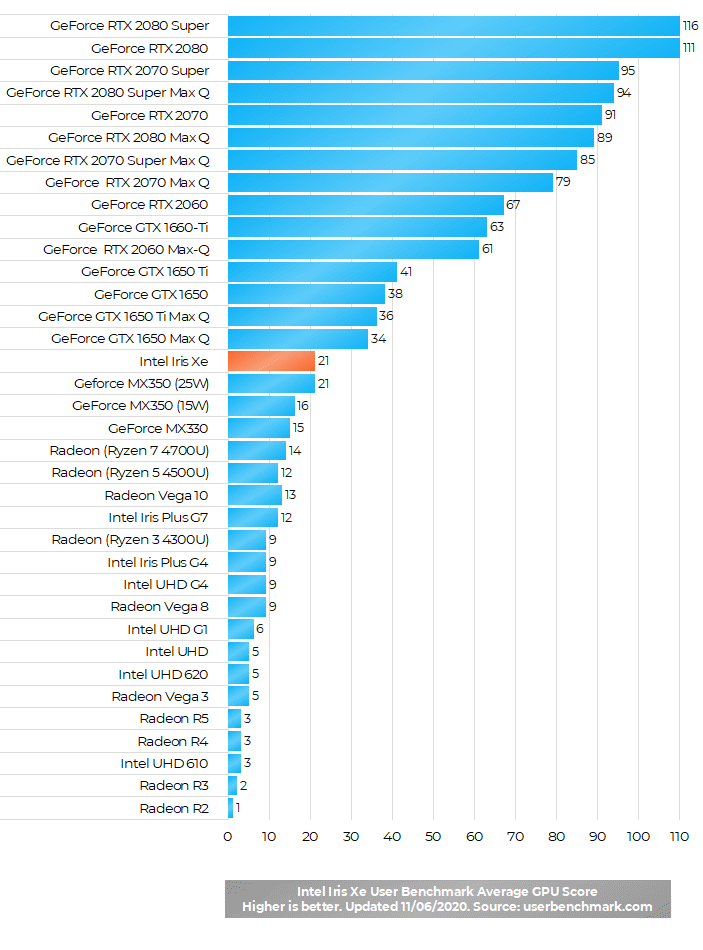
Here’s a benchmark score of the Intel Iris Xe compared to other widely used graphics processors for laptops.
Note: This post was updated on 12/13/2023.
How many storage count intel iris xe graphics
You probably mean what is video memory size of the Iris Xe, right? It doesn’t have its own memory. It uses a portion of the laptop’s main RAM memory, depending on a task.
Should i buy i5 11th gen with integrated iris xe or i5 10th gen with dedicated graphics ?
Which is better combo ?
The Iris Xe is an entry-level graphics processor, but you can definitely play many light games like Minecraft, Roblox, or League of Legends. For a fluid gameplay of heavier titles like GTA5, Fortnite, PUBG, or any new AAA game, you’ll need a dedicated gaming class video card like one of the Nvidia RTX series and ideally 16GB or more RAM.
But, even for light games on Iris Xe, it’s better to have dual channel memory like 2x4GB instead of 1x8GB. I hope you have the dual.
Is iris xe g7 better than nvedia mx 330?
MX330 is better than Intel Iris G7.
Software I need to download says
“ 3D class video card with 1 GB of memory or higher and support for hardware acceleration.” Is the Intel Iris Xe sufficient?
Hi, generally the Intel Iris Xe isn’t a “3D class video card”. It’s an integrated graphics processor which uses the notebook’s main memory since it hasn’t its own. It is much weaker than what’s usually considered to be 3D class video cards with their own memory. For example, the Nvidia GeForce GTX or RTX series with 4GB, 6GB, or 8GB video memory.
Nevertheless, the Iris Xe is a good performer in comparison to other integrated graphics processor and it can utilize 1GB of the main system memory. It’s possible that it can work with your software, but still it will run graphics operations much slower than real video cards.
Please answer how much system RAM Iris Xe uses on 11th gen i5-1135G7, if it uses 2GB of System memory, i’ll have 5.59GB RAM usable if I have 8GB RAM.
It will take whatever memory it needs from system RAM until specified limit.
Does the intel xe graphics feature a Hdmi 1.4b or hdmi 2.0/2.1 protocol?
Intel Iris Xe of laptop processors features HDMI 2.0b. However, it also depends on the notebook model. Some of them have HDMI 1.4 port although the graphics processor supports 2.0b. In that case, video output of the laptop will not support 2.0 or higher.
If a computer has mx350 vc and the iris xe is on the chip is it possible to use the xe instead of the card?
Yes it is. There’s an option in Nvidia’s GeForce control panel under Windows to select Intel integrated graphics instead of the Nvidia video card. You can choose to always use the Xe or you can do it based on application. For instance, Intel Xe when you use web browser and MX350 when you run a game.
Which is better?
Intel core i5-1035g1 with nvidia mx350 vs intel core i5 11 with iris xe grahphic?
Do you know what MX350 version is in question – 15 Watt or 25 Watt? If it’s 15W than it’s very similar to the Iris Xe performance-wise and the 11th Gen i5 processor itself is slightly better than its 10th Gen counterpart. If the MX350 is 25W, than that option is better graphics and gaming wise. In both cases the MX350 has its own video memory, so it doesn’t take up your main RAM. On the other hand, the Iris Xe option is better when it comes to power consumption and heat.
can i5 11 gen 8gb ram iris xe graphics play cod warzone or cold war
no, i have i7 and 16GB ram iris and i cnat play it
Why do you guys say cant to Warzone man, I have the Inspiron i7 with 8Gb ram and Intel Irish Xe graphics as well as Nvidia MX330 and warzone is totally playable, but at medium settings 1080p, and for Cold war,i don’t know man because i didn’t purchase that coz it’s too expensive and i think with this entry-level graphics it won’t be able, But warzone is completely playable
Does the Iris Xe support ultra-wide displays? Having difficulty finding resolution and aspect ratio details.
Sorry for asking, out of curiosity, why would you prefer using your RAM instead of the memory provided by the mx 350? They score exactly same performance-wise
Integrated graphics processors like the Xe generally consume less power than dedicated video cards like the MX350. That’s usually the main reason for switching to IGP, besides cooler operation of the laptop.
What GPU would be best for Primavera P6/Asta Powerproject ?
Asta PowerProject doesnt really need any particular GPU. We’re currently using Thinkbook 13’s and have no issues with Asta.
so if my comp has i7 11th gen and 32gigs of ram, could I play more demanding games or is the videocard still not good enough. I guess my question is the more ram I have the more demanding games i can play or is there still a limit to what it can play.
if the more demanding games are like GTA V, CS: GO, Genshin Impact, probably yes.
if it is like DOOM, RDR, Cyberpunk no, it won’t run even in the crappiest settings.
i have matebook 14 2021 which has intel i7 , 16gb ram and intel xe and i run games like warzone , pubg , borderlands 3 fallout 4 with no issues even runs Ark survival evolved on high graphics settings
Its been 2 months since my order. I will write a better review when I receive my 17t-cg100
1)How much ram will iris xe use from my i5 11th gen 8gb ram…
2)What if i upgrade my ram to 12gb,will performance increase..
3)Or should i buy a dedicated 2gb mx350.will there be significant performance change?
Bcoz in India now laptop with integrated Iris xe costs Rs.55000
And Mx350 costs Rs.60000
Is it worth to buy mx350 or can i get good performance by upgrading ram in iris xe laptop
How much dedicated video ram does this graphics card have?
none, it uses your system RAM.
have an Asus ux482 w (i7-Iris Xe) using the HDMI port to an LG 5k monitor. Why is it that graphics and text are distorted on the display set on full resolution?
Using another pc with Iris the display was ok set on same resolution.
Does this mean upgrading my RAM also upgrades the graphics card?
The graphics processor is built into the main processor and it isn’t upgradeable. However, adding more RAM can help with graphics processing. For instance, if you currently have only 4GB, upgrading to 8GB or more will allow the graphics processor to use a larger portion of RAM as video memory and provide better performance in many games. Also, if you have single channel RAM like 1 x 8GB and upgrade to dual channel like 2 x 4GB or 2 x 8GB, that will noticeably boost graphics performance.
Does this mean that if my Iris Xe use my laptop RAM, which is 16GB, the video RAM will also reach 16gb ?
Yes, it uses RAM but not all of it. Integrated graphics processors like the Iris Xe typically use up to 2GB of RAM for graphics processing purposes.
Does the graphics card have shadow model 3?
By using this process does my laptop ram will gets damage?
This graphics processor uses RAM, but normally it shouldn’t damage it. But yes, RAM is used more with this graphics processor in comparison to dedicated video cards that have their own memory. Also, with integrated graphics processors like the Iris Xe you have less RAM for other tasks than with a dedicated GPU with its own memory.
I own a Samsung gaming laptop with the Intel Iris Xe Graphics, and I only played one game. not even a high graphics required game ( Final Fantasy XIV) I’ve noticed the machine gets VERY hot where the graphics card is. Is there a solution for this problem? or would an external cooling fan help to lesson the heat? I’m concerned after a few hours of game play it might overheat, and damage it.
Laptops indeed can get hot while gaming, especially those with thin design. Cooling stands with active fans can help a lot with that issue.
Hello So I purchased my laptop i7 11gen 16gb ram with iris xe. When I played Gtav I was recieving 60-80 fps at 1080p but now even at 800*600 resolution I can barely get 10 fps. I even Selected Gtav in intel graphic command center but still I am not able to play even at lowest settings. Is the issue related to iris xe optimization or if it is the problem from intel’s end?
Thank you!
Hello Himansh, I am a computer and phone repair technician working in a major chain company. Based on the what intel xe graphics can do, there’s simply no way that the xe graphics on their own could have gotten you 60fps at 1080p in GTAV, I suspect that you have a separate graphics card in your computer, and for whatever reason the game now is attempting to run only on the xe graphics instead of using the GPU like it should. I recommend checking “device manager” (if you are using windows), and taking a peek under “display adapters” near the top of the page!
Iris XE can GTAV for atleast 50 fps. I think it might be because something is using all of your ram or cpu.
I purchased Motorsport Manager from Steam in 2018 on an older laptop. I do not remember the Graphics Gard specs of that laptop, but it might have had a 2 GB dedicated card and 8 GB RAM with intel i3 processor. I recently purchased a new Lenovo laptop which has 11th Gen i5, 16 GB RAM and Intel iRis xe graphics. Downloaded and installed the same game from steam, but it immediately crashes after launch. Any ideas? I am quite sure that my system specs are way above the required specs for the game.
hello I’m trying to run a deep learning model on my local machine but I don’t know how to use my GPU iris Xe when I try to check if it’s available or not the answer is false (not available )
Hello,
I want to install F1 2020 on my laptop. The specs are i5-12th gen 12 cores, 16 GB RAM and Iris Xe Graphics.
Would it work fine?
I use Blender for 3D graphics. Recently, it introduced oneAPI for GPU rendering which it states requires Xe-HPG architecture.
Does my shiny new (1yo) Dell Inspiron with 12th Gen (i51235U) “Iris Xe Graphics” support this architecture? If not, are there any plans for driver updates to this chipset that will support it?
Can I run Solidworks 2020 on Intel Iris Xe Graphics, CPU: Intel i5-1235U, 24 GB RAM?
Asus i5 evo – iris xe – 8gb ram – oled display 15.6 laptop >>
I bought this unit for less than $600 new.. I challenge you to find me a better deal for OLED… This unit has a setting for 120hz or 60hz refresh rate… My question is, why does everyone say i cant run any games on it? what component would cause the game to crash? the ram? The processor? is the graphics card would catch fire? Im new to this
I want to play the new South Park Snow Day game when it comes out on March 26th. I was wondering if my specs (which are Intel i7-1355U, Intel Iris XE, 32 GB DDR5-5200 ram, and 1TB SSD) will work.
This guy runs the game on the i7-1165G7 with Iris Xe and 16GB RAM on Full HD resolution and low detail settings at 20-something FPS. Maybe reducing the resolution to 720p can make it more playable.
Gameplay: https://www.youtube.com/watch?v=fYmlSaXD8Cg
I am not a gamer but I do want good graphics for editing photos in Lightroom Classic? Is the Intel Iris xe adequate? Also I’ve been looking at NVIDIA® GeForce RTX™ 2050 in a Dell inspiron. My current laptop has NVIDIA Geforce MX250 graphics with Intel(R) Core(TM) i7-8565U CPU @ 1.80GHz 1.99 GHz with 8.00 GB RAM. It balks at moving between raw files.
Thanks
A late reply, but maybe still helpful to you and other readers. Lightroom can utilize GPU for some actions, so for these actions it’s much better to have a dedicated GPU like the Nvidia RTX 2050.
“Lightroom Classic can use a compatible graphics processor to speed up tasks of displaying and adjusting images in the Develop module, the Library module’s Grid view, Loupe view, and Filmstrip. Features like Select Subject, Select Sky, and Enhance Details are also accelerated by the GPU. Using a compatible GPU can provide significant speed improvements on high-resolution displays, such as 4K and 5K monitors.”
Link: https://helpx.adobe.com/lightroom-classic/kb/lightroom-gpu-faq.html#gpu-for-display
i have an i7-1165G7 with Iris Xe and 16GB RAM will it run fifa 22
Yes, it will run on low FIFA 22 graphics settings, but it is questionable how smooth will it run. This guy https://youtu.be/kXqpXe8cAl4 shows on 720p resolution and low settings you can have more than 100fps, and here https://youtu.be/EEBy4Fk87kI you can see it runs fairly well on 60fps. But, this guy https://www.youtube.com/watch?v=Dpj-4P2GU60 shows only 20-ish fps, probably due to low RAM of 8GB. I bet you have dual channel RAM and with 16GB of it should be able to run nicely on the Iris Xe on low settings.