
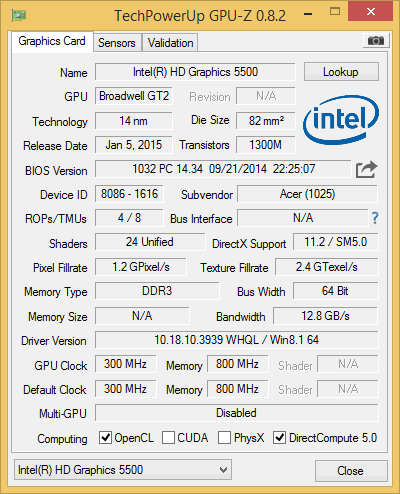
The Intel HD 5500 is the most important graphics processing unit for laptops in 2015. Although it isn’t a high-performance one, the Intel HD 5500 is probably the widest adopted GPU for mobile PCs on the current market, since it is integrated in the popular Intel Core series processors. Precisely, the 5th Generation Intel Core Broadwell CPUs, such as the i3-5005U / i3-5010U, i5-5200U / 5300U, and i7-5500U / 5600U. These chips are used in numerous mainstream, thin-and-light, and business-class laptops, which are primarily designed with everyday home and office computing in mind, rather than high-performance for demanding games and other intensive tasks. Laptops with Broadwell processors currently start at around $500.
Intel HD 5500 3D Mark 11 Benchmark
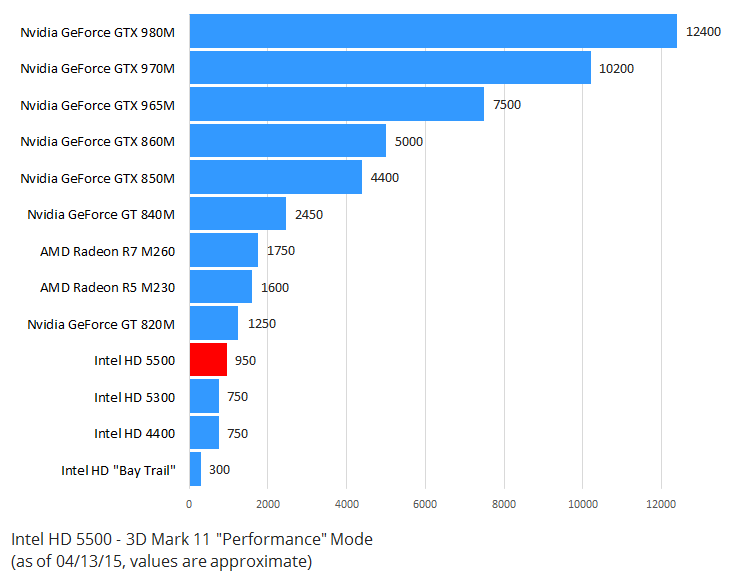
| Intel HD “Bay Trail” | 300 |
| Intel HD 4400 | 750 |
| Intel HD 5300 | 750 |
| Intel HD 5500 | 950 |
| Nvidia GeForce GT 820M | 1250 |
| AMD Radeon R5 M230 | 1600 |
| AMD Radeon R7 M260 | 1750 |
| Nvidia GeForce GT 840M | 2450 |
| Nvidia GeForce GTX 850M | 4400 |
| Nvidia GeForce GTX 860M | 5000 |
| Nvidia GeForce GTX 965M | 7500 |
| Nvidia GeForce GTX 970M | 10200 |
| Nvidia GeForce GTX 980M | 12400 |
Game Benchmarks
For this test, we used an Acer Aspire E5 laptop with the mid-range Intel Core i5-5200U chip which contains the reviewed graphics processor, 4GB of RAM (for Call of Duty Advanced Warfare test we had to upgrade to 8GB), Windows 8.1 operating system, and the latest Intel HD graphics drivers installed. For gameplay recording we used a dedicated video capture card, so there are no slowdowns in games due to software-based capturing. It’s worth noting gameplays are slightly slower and faster on the i3 and i7 Broadwell chips with the HD 5500, due to differences in raw CPU power. Another important factor is whether you have single-channel or dual-channel system memory setup, where dual-channel (i.e. 2x4GB instead of 1x8GB) setups can give noticeably better benchmark results and gaming experience. Also, different notebook designs and their cooling systems, as well as BIOS settings, can influence graphics performance. The laptop we tested appears to deliver somewhat lower results than other systems with the same core specs.
League of Legends, the most played online PC game, runs without a glitch on “Medium High” settings at 1080p 1920×1080 resolution, with character, effect, and environment graphics quality set on High, shadows set to Medium, and anti-aliasing turned off. In-game performance is between 35 and 40 frames per second most of the time. The final result is a very smooth gameplay.
Another important MMORPG title with large players’ base is DOTA 2. It is more demanding in terms of hardware for smooth gameplay than League of Legends, so you have to dial down settings quite a bit. The best DOTA 2 experience on Intel’s HD 5500 appears to be with resolution set to 720p (1280×720), shadow and texture quality on “Medium”, and advanced graphics features turned off. The settings result in frame rates of around 40 fps. Default DOTA 2 settings for the GPU at 720p include anti-aliasing and other features turned on and shadows and textures set to “High”. But, the frame rates drop to 25-30 fps in that case.
Minecraft is among the top titles on popular PC games charts for years. On the reviewed GPU, it runs very smooth on “Fancy” (high) settings, with fps values gravitating toward 35 fps. If you set Minecraft graphics to “Fast” (low), frame rates will reach above 40 fps.
World’s most popular first person shooter – Counter Strike: Global Offensive – can be played decently smooth on the GPU. For instance, one of the optimal graphics detail setups includes resolution set to 720p, “Medium” details, and anti-aliasing turned off. Frame rates are around 35-45 fps with the setup.
Battlefield 4 first person shooter requires a good video card and processor in order to run decently. On the HD 5500, you’ll have to put the in-game graphics settings to minimum and set the resolution to 720p. The result is a merely playable experience, with fps varying between 20 and 25 fps.
The recently released Call of Duty: Advanced Warfare from the same genre needs a beefy computer to enable smooth gameplay. Unfortunately, the game felt choppy on the reviewed GPU, with fps oftentimes hitting below 20 mark, although all details and resolution were set to low. For this game we had to upgrade RAM to 8GB (other games were tested with 4GB). The game itself consumes nearly 4GB, plus you need memory for operating system and integrated graphics.
In Skyrim, the Intel HD 5500 performs better. You can run it reasonably well only on the lowest settings and 720p, but gameplay is pretty much smooth on these settings. FPS values are close to 30.
For FIFA fans, it’s worth noting the latest release – FIFA 15 – can be played on Intel’s integrated GPU, but only at minimal settings. At 720p, graphics quality set to low, and anti-aliasing turned off.
Video Playback
Full HD and Ultra HD (4K) video playback was a piece of cake for the tested system. CPU utilization increased only around 2 percent during playbacks of a YouTube video in Internet Explorer in 1080p (FHD) and 2160p (4K), while GPU utilization was ~10% and 15%, respectively. Of course, the playbacks were completely fluid.
Conclusion
Although it isn’t designed nor advertised to be a gaming graphics processor, the Intel HD 5500 is able to satisfy the casual gamer. It supports high-resolution video playbacks, including 4K, without a glitch. Gameplays are much better than on the Intel HD series found on the budget Celeron and Atom “Bay Trail” processors. The GPU is also faster than its precursor – the Intel HD 4400 of the 4th Gen Intel Core “Haswell”. But, the HD 5500 isn’t even nearly as fast as the available lower-mid-range dedicated video cards for laptops, such as the Nvidia GeForce GT 840M. 3D Mark 11 benchmark results confirm that. On the positive side, if you go for a notebook with the HD 5500 only you will avoid extra costs, greater power consumption, and higher temperatures associated with laptop models with dedicated GPUs.
We give the Intel HD 5500 four stars. For details and real-world use test, read the Description of this page.
What software you used for recording? Will I have higher fps in real life?
Your review is rendered meaningless by the fact that you only have 4GB of memory in your test machine.
Per the link below, Call of Duty takes up 3.70 GB all by itself, which doesn’t even leave enough memory for the OS, let alone any graphics – no wonder you got such horrible results!
http://laptoping.com/laptop-pc-ram-size-and-performance-explained.html
Put another 4GB of memory in your machine, run your tests again and report the results, please.
Hi there!
& thanks for your review
Is there on the market some external video cards that I could hookup on my system to overwrite the HD 5500 or complete it? Something that could upgrade my graphic power to the level of for example AMD Radeon HD 7870 / NVIDIA Geforce GTX 660? Similarly as I do to extend my data’s storage with a Seagate but in this case it would be about Graphic performance improvement.
I explain below
I am not an expert in PC gaming system configuration but I acquired a new laptop that is usually designed for military personal and the CPU indeed come with the integrated HD 5500 Graphic Card
My hardware config is: (Platform: Intel Core i7-5600U, 2.6 GHz with VPRO & 4M Cache, up to 3.20 GHz in Turbo mode) + (OS / RAM: Microsoft Windows 8 Professional x64 with 16GB DDR3 RAM) + (Storage: 256GB SSD)
In addition to this set up a friend of mine gave me a BenQ monitor XL2420G so I thought I would have fun playing games such as Battlefield 4 with this military laptop but by your review it seem that I might be disappointed. I’ll be glad if I could find an external support or replacement to overwrite or boost the integrated HD 5500 when at times I want to play games or need extreme graphic power.
Otherwise I am afraid to be pretty stuck where I am right now… am I?
Thanks for reading & eventually sharing your thoughts…
Cheers!
Fred
Thanks for your quick follow up Dani!
To answer your question it’s a GETAC V110 second generation…. it’s not a gaming laptop in first place as it is mostly used for military applications requiring rugged equipment and enough power to run complex maps, video’s & pictures. I am not an expert but I am guessing It’s a small rugged laptop with the power of a very good office desktop.
I am going to read your links but earlier I also came across this funny speaking guy on Youtube who pretty much nailed it. https://www.youtube.com/watch?v=lklIhZJBaJM
I might just have to buy one of those gaming laptop otherwise if you know a good reliable source of information online to build my own gaming desktop please share because I always wanted that however was never able to click with the right crowds to get the best information’s avoiding in the process to mess with my fun, time & money….
Cheers!
Fred
Toshiba satellite s50-b-150 (i7 5500u) win 8.1
Lol 1080p low/med settings out of combat 60 in combat 40-30 fps.
Cs:s 1080p low(textures maxed) out of combat 60-80 in combat 50-40-03 fps (depends on maps and players)
Portal 2 ran well at 1080p, but it was buggy. Maybe a OS thing….
uts2 1080p fps about 30-20-15 with 100%scale…..
cs:go is a no no(45 fps 720p all low….)
Good morning,
I am thinking about buying a laptop with the following specs:
model: Acer aspire v3-572g-57vu
cpu: intel core i5-5200u (dual core, 2.2 to 2.7 ghz)
gpu: intel graphics 5500 + nvidia geforce 820m 2gb
ram: 4gb single channel
display: 1366×768
os: windows 8.1
I would like to know if it is good for watching FHD and UHD video (streaming or from support), obviously on an external display being the onboard one just HD.
Is it a system that can assure me good performance in the coming years (at least for the next 5 years) or should I buy something else?
As an alternative, there is also another acer of the some series but having cpu i7-5500u and gpu nvidia 840m.
Thank you for your attention.
Regards,
Fulvio (Italy)
heyy there I am new to this whole graphics game but I had a budget of 500 dollars where I have planed to buy a toshiba satellite c55-c5421 ish it’s specs were quiet eye catching with a Broadwell intel i5 thingy a 8gb ram powered by windows 10 now my question is that will all this be enough for a good gaming experience?
Thanks in advance.
Hy I have bought a laptop HP 15 ac 101tu has core i3 5th generation having intel HD 5500 GPU, should I change it to HP 15ab028 tx having Intel core i3 and GPU and redeon r7 360 as I have to work on AutoCAD and 3 d studio max , in 3d rendering then the is 15 ac 101tu is sufficient ? Experts tell that Intel CPU, GPU combining will be best for cooling. Is it true…? Plse suggest , ,,,, Santanu , Kolkata, India
Where is easier to play videos for a cpu or gpu- on youtube or on a media player like gom player etc?
If it plays 1080p videos on youtube smoothly, does it mean that it will play same video on gom player with same performance too?
Small question –
I currently have a Dell Inspiron 15 5000 series with Intel i7-5500U CPU, 16 GB RAM, Intel HD Graphics 5500 (display) + NVIDIA GeForce 920M (render).
I have troubles playing a few games with high FPS (example; RuneScape with the new NXT client).
Is it possible for my laptop to be upgraded from an Intel 5500 display to like NVIDIA GTX 860M?
Is it possible to be upgraded at all?
I am taking dell inspiration i5554787red with 1tb hard drive core i5 8 gm ram and Intel 5500hd graphics it is good for gaming !??
I just brought a hp pavilion ab223cl
with 8gb ram
intel 5500
core i5 5200U
You think it will be able to play star wars battlefront 2016.
Lies, i have this exact model, will NOT RUN and cannot run even fallout 3 or for. Skyrim crashes. This happened when the NEW fresh out of factory computer. HP, steam, and fallout tech services all said no way it cannot. Basically got lied to by beat buy before i knew what i know now. Still not sure if external gpu will work, but i was told no because the mother board cannot support it
This computer is very bad for gaming, i prefer you don’t play a game on steam as your computer will heat up so much only after a couple of minutes, i do not recommend you buying it.
it’s more like a snail than a graphics card
not at bad at all
not at bad at all good for casual gamer not for hardcore
I have intel hd 5500 with intel core i3 5005U 16GB Ram and play Battlefield 1 multiplayer on lower/medium. And BF4 is running smooth af. After upgrade with SSD game experience is even better. Not bad for a business laptop.
i have dell i7-5600U with 16GB Rabm & intel HD graphics 5500, can i play devil may cry 5 on this ???
I have a core i3 ,5 th gen with 8gb ram.I have played ww2, battlefield 1 and 4,cod advanced warfare with low graphics . It is not bad for a casual gamer
As long as it plays Minesweeper… then it is better than a rtx!
Jokes aside it is really not a bad integrated graphics card, I have seen worse than this.
Minecraft, Skyrim and old games like Gta vc, Gta sa, Need for speed Underground 1 & 2, Need for speed Carbon, Need for speed MW and any well “optimized games” should work fine.
And i can even do 1080p video editing on this graphics card with ease.
Though i do have some doubts about 4k video playback… i do get stutters on youtube (it can be my internet…)
All in all i give this a good five stars as i can do my studies just fine and and also do some relaxed gaming with my friends here and there…
N O T B A D D
it s possible to upgrade the video card to get a dedicated video card?,i have ASUS i35005u 4 gb of ram and intel hd 5500…
Can Intel HD Graphics 5500 on Dell Inspiron 15 3558 15.6” touchscreen with Intel Core i5-5200U support 1920×1080 resolution?
Tengo una Dell Latitude E5450.
Intel Core i5 5300U
Intel Hd Graphics 5500
8 Gb de RAM
Quisiera saber si se le puede poner una tarjeta de video externa (O dedicada) Y de ser posible, hasta cuantos Gb puedo aumentarla…
O como puedo hacer para que me corra juegos como el GTA V.
Gracias.
I have this (Intel HD 5500) and (AMD Radeon (TM) R5 M430) …
when i instel the intel i lose the AMD card .. why is that ????????
does it support avx intructions?
I have a lenovo laptop with an intel HD Graphics card 5500 and has an i5 processor. Will this be able to display to a 3440 x 1440 ultrawide display.
Thanks