

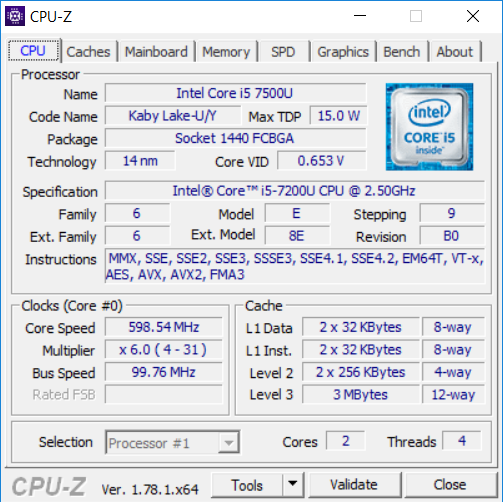
 The Intel Core i5-7200U is a member of the latest 7th Generation Intel Core U “Kaby Lake” laptop processor family. The i5-7200U is a mid-tier dual-core CPU in the 7th Gen series, as opposed to lower-mid-range i3-7100U and upper-mid-range i7-7500U from the same family. The 7th Gen Core U chips are essentially only minor upgrades of their 6th Gen “Skylake” precursors. They are all aimed at use in the mainstream laptops, such as the common 15.6-inch all-rounders. Also, they are based on the same 14-nanometer production technology and have a thermal design power of 15 Watts. As the main improvements, the 7th Gen i3, i5, and i7 CPUs have slightly faster clock speeds over their 6th Gen counterparts. Additionally, Intel highlights further improvements in Ultra HD (4K) high-resolution video playback, such as longer battery runtimes when playing UHD content.
Intel Core i5-7200U 7th Gen CPU Benchmark
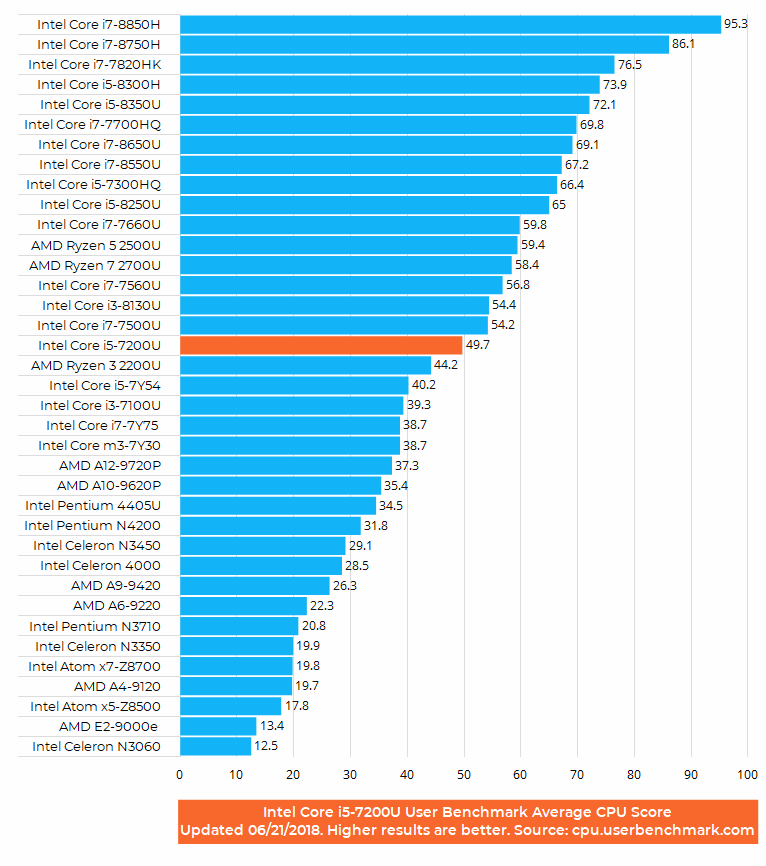
The Intel Core i5-7200U has a base clock speed of 2.5 GHz and TurboBoost up to 3.1 GHz. For comparison, the older i5-6200U runs at 2.3 and 2.8 GHz in base and turbo modes, respectively. That’s the main difference between them and it’s visible in the benchmark chart. The 2.4 GHz i3-7100U lacks TurboBoost, which is the main reason why it lags behind the i5 in the benchmarks, as you can see in the User Benchmark test chart above. The i7-7500U with higher clock speeds of 2.7 – 3.5 GHz and 4MB cache size instead of 3MB on the i5 and i3 is indeed faster in benchmarks. However, it’s worth noting that most users probably won’t notice any difference between the mentioned CPUs in the real-world everyday computing.
2018 Update: The i5-7200U CPU is still an excellent processor in 2018, but the newer version – the 8th Gen i5-8250U, scores much better thanks to its quad-core design. But again, in usual everyday use the difference isn’t big.
i5-7200U Real World Use Review
Our real world-use video (below) can give you a glimpse of what everyday computing looks like on laptops with the Intel Core i5-7200U. For this review, we used a Lenovo IdeaPad 310 15.6″ laptop with the i5-7200U, integrated Intel HD 620 graphics, 8GB of main memory, a common mechanical 1TB 5,400 hard drive, Full HD display, and Windows 10 Home operating system. Please keep in mind that the i5-7200U combined with solid state drive storage instead of hard drive can provide much snappier Windows user experience. Also, other factors such as RAM and graphics specs and laptops’ cooling designs can influence performance of OS and common apps, too. But, not as much as storage device type.
The test confirmed our estimation that the i5-7200U really isn’t meaningfully faster than its i5-6200U precursor during normal computing activities. A very small performance gap might be visible in some harder tasks like transcoding in video production or applying image filters in professional photography editing. For these duties recommended are the quad-core Intel Core i7 CPUs, such as the popular i7-6700HQ. With the quad-core i7 chips these heavy tasks can be completed noticeably faster.
Back to the common scenarios like web browsing, online video streaming in Full HD resolution, work in Microsoft Office productivity suite. For these tasks, the Core i5-7200U is an unmistakable choice, as you can see in the video.
Intel highlights in the press materials hardware optimization of 4K Ultra HD video playback on the 7th Generation Intel Core processors. We have tested 4K YouTube videos in web browsers and local 4K files in some Windows programs. YouTube UHD videos in Microsoft Edge and Google Chrome browsers run amazingly smooth on the i5-7200U, with a CPU load of around only 2 percent. The same applies to Windows’ native Media Player program, which is able to play perfectly 25, 30 and 60 fps Ultra HD. We have, however, noticed a bit higher stress on the CPU when playing 25 fps and 30 fps files in Gom Player, with a ~20% CPU load but still completely smooth video. Unfortunately, we weren’t able to watch 60 fps 4K videos in Gom and any 4K video in the popular VLC Media Player, since playback was too choppy. We’ve tried to adjust some software settings to make the questionable videos run properly and tried different 4K video formats, but with no luck. That is very likely a software issue, since WMP was able to handle 60 fps 4K on the same hardware easily.
As for gaming, it generally requires a good dedicated video card and a quad-core Intel i7 CPU to run easily. Since the tested laptop only has the basic Intel HD 620 graphics which is integrated in the dual-core i5 CPU, gaming potential is limited. But, many of today’s most popular games like League of Legends, Minecraft, or Counter Strike will run very decently on the i5 & HD 620. You can read more about gaming on the Intel HD 620 in this review or take a look at the video playlist below.
My question is how good is this CPU at gaming because my old laptop(i3) sucked. Can you rate from 1-5.
Thank you for your time and reply.
Greazt post, I believe peple should acquire a lot from
this web site its very usr friendly. So much fantastic information on here
:D.
How can I reset my hp
can i depend on i5 7200u, ssd, 8gb ram, 2gb mx130 configured laptop for normal video editing(not 4k type) once or twice in a week?
MI SONO COMPRATO UN SEMI ASSEMBLATO ASROCK BEEBOX S i5 7200U INTEGRANDO POI 16 GB RAM DDR4 CORSAIR E SSD SAMSUNG NVME DA 256GB. IL MIO PROBLEMA è QUESTO : VENTOLA SEMPRE ACCESA ANCHE CON ZERO PROGRAMMI IN ESECUZIONE ED AVVIANDO UN QUALSIASI BROSWER LA VENTOLA ACCELLERA DI PIù, HO AGGIORNATO TUTTI I DRIVER TRAMITE SITO UFFICIALE DENTRO AL BOX è TUTTO PULITO SENZA POLVERE SENZA PERO’ A RISOLVERE PROBLEMA DELLA VENTOLA RUMORSA E QUASI SEMPRE ACCESA ANCHE DA PC APPENA ACCESO PER CUI ANCORA FREDDO. PREMETTO CHE HO IL BEEBOX S DA QUASI 2 ANNI IL PROBLEMA ESISTE DA 6 MESI. CHIEDO INFO SU COME RISOLVERE PROBLEMA, SALUTI 02/01/2019
These is a laptop with monitor type?
Intel core i5 7200U full details and specification of aquainted!..