

The Intel Celeron N4000 is a lower-end processor you can find in affordable laptop PCs. As a basic CPU, it has only two cores with a single computing thread per core. On the positive side, the Celeron N4000 has a decently high maximum clock speed of 2.6 GHz, an unusually large 4 MB cache for the budget processor category (as opposed to more common 1 MB or 2 MB), and a power-efficient design with a power consumption of 6 Watts. Furthermore, thanks to its good thermal characteristics the N4000 enables fully fan-less and totally quiet designs of notebooks with it.
Intel Celeron N4000 Benchmark
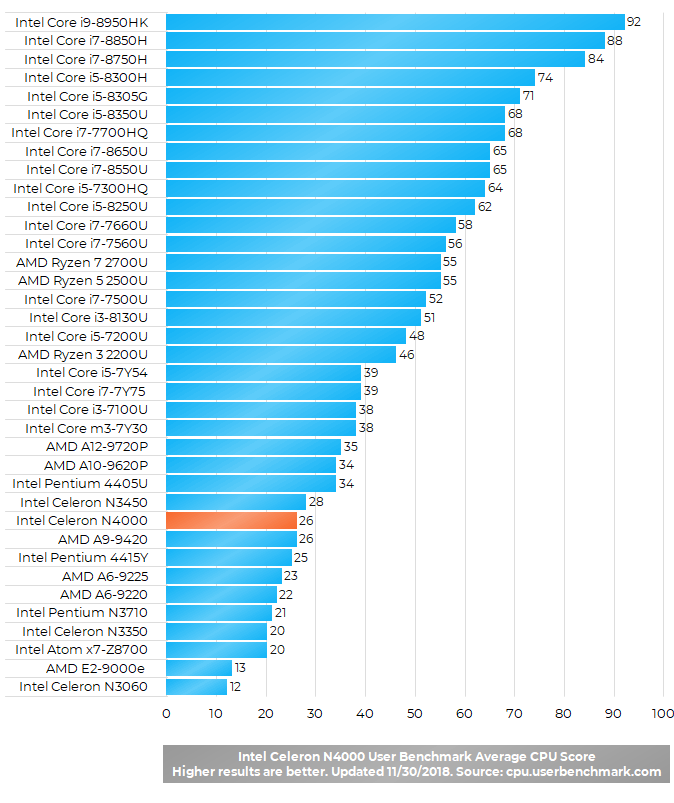
The Intel Celeron N4000 benchmark results indicate the chip is among slower notebook CPUs. Nevertheless, it is a decent solution for non-demanding day-to-day tasks. It’s suitable for light web browsing with a couple of browser tabs opened simultaneously, work in Microsoft Office programs, movie watching, or web conferencing. For heavier duties like video editing, notebooks with mid-range and high-end CPUs like the Intel Core i-series are recommended. But, these aren’t as cheap as the Celeron N4000-equipped laptops and they must use cooling fans.
The Intel UHD 600 graphics which is embedded in the N4000 is a very basic graphics processor. So, laptops with the Celeron N4000 / UHD 600 can run only the most basic PC games.
Perfect for a general use laptop & even a little more !
what is the generation of N4000 Celeron Intel ???
And how to calculate
This processor can support few Microsoft Excel windows opened at the same time and plus few chrome tabs open?
I have two notebooks (PEAQ S130) wirh N4000. WIth thew same application, one runs slower than the other (about 20% slower). Why ?
I have two notebooks (PEAQ S130) with N4000. WIth thew same application, one runs slower than the other (about 20% slower). Why ?
Can I use 8 GB ram with this processor
Is it 32 or 64 bit architecture?
It runs world of warcraft classic. Bought this for my 7 year old daughter, it was $150. I install wow classic to see if it ran at lower settings, it did. Got to play in the plane without having to bring my big heavy gaming laptop.
it is which generation
I’m a programmer, could I run 2 servers and have a browser with some tabs opened simultaneously? Would it be superslow? is there a way I can test this? thanks 😀
Can i work Photoshop smoothly with celeron N4000
The Intel Celeron N4000 actually performed better than I expected.
I ran some games such as DmC: Devil May Cry, Sleeping Dogs, Borderlands 2(at 720p with some tweaks, Naruto Ultimate Ninja Storm revolution, Deadpool, Assassins Creed Rogue, Batman Arkham Asylum, Saints Row 3, Devil May Cry 4 (at 720p with all settings on low) and the other games listed above, I ran at a custom resolution of 960×540 and some others at 800×600 and to my surprise they all gave a decent fps of about 23 – 30(Some even performed better) and I’m pretty sure if a some are ran at 640×480, better results will be produced.
So, if you’re looking for a budget PC which can perform fairly demanding tasks, I think it’s an okay processor.
Besides, all the above games were tested on the Hp Stream 14 with 4Gb ram, so if you were to get a notebook having 8Gb ram, that’s even better.
That’s my verdict on it.
I have problems playing minecraft with N4000. PC restarts, and I suspect due to overhelming…could that be possible without fan??
I have N400,RAM (4GB),64BIT.My laptop runs kinda bad when I even open browser CPU maxes to 100% in the start it maxes up to 100% at one point it’s ”system interrupts” mostly I bought this laptop for school mainly for ”Photoshop” and I love music so I have always open app called ”spotify” and after couple minutes I have CPU again maxed to 100% and photoshop starts to work slower .
which fifa from fifa 12 to 20 can i run or play on a pc with a processor name :Intel(R)celeron(R) N4000 CPU @1.10GHz …{memory 4GB}windows 10 without having much issues
¿Podría poner un grafica externa como una gt 710 o una gt 1030 con el procesador Inter Celeron N4000 y 8gb ram?
Finally I can improve the performance by increasing the TDP. The tutorial is for N4100, but works in N4000
Check in Google with keywords “how to increase TDP Celeron N4100”
hi, my laptop processor is N4000. Is there a way for me to install avx manually since n4000 does not support avx?
Acabo de adquirir un portátil con un procesador Intel Celeron de N4000, tiene un socket 1090 FCBGA me interesa saber si lo podría cambiar por uno mas alto me pueden recomendar alguno??
Agradecería mucho su respuesta
I use N4000 for drawing, the graphic is good. when I connect to pen tablet only can do duplicate screen. but no big deal, since I still can divide 2 views in one screen.. I tried use animation app like blender and vroid. it’s no problem. only with my memory capabilities I have, I need to directly save it out in external memory. Again no big deal. I use multiple things at once. speed fast too.
It’s too heavy for complex video editing like black magic.
PS elements is fine.
Is it possible to run VisualBox under Kubuntu on a labtop with N4000 Celeron simulating Windows-XP ?
Hi, Does Intel C-N4000 support 500gb SSD? or more?
it is currently using 256 ssd. but I’m not sure if I can Upgrade my ROM
Thanks in advance