

Acer Chromebook 315 CB315-4H-C7A1 15.6″ Laptop with Intel N4500, 4GB RAM, 64GB eMMC
$219.99
Add to CompareSpecifications
| Manufacturer |
Acer is among the top 10 laptop manufacturers in the world. The company is mostly known for their affordable Aspire notebook PCs, but they do make some higher end models as well, including gaming laptops. |
|---|---|
| Series |
Acer Chromebooks, just like other Chromebooks, are popular among students, professionals, and everyday users thanks to their affordability and ease of use. Acer offers a wide range of Chromebooks – from ultra-affordable laptops to premium convertibles and cloud gaming-focused models. |
| Laptop Type |
Chromebooks are lightweight, affordable laptops optimized for cloud-based computing. They offer seamless integration with Google services, fast boot times and long battery life, making them ideal for students, casual users, and web-centric tasks. The traditional clamshell laptop design is considered to be the standard one, as opposed to 2-in-1 convertibles. |
| Performance |
Laptops with basic computing performance can handle everyday home and office tasks, but the user experience may be less smooth than on typical mid-range models. |
| Typical Use |
Even the cheapest laptops with basic specs, besides smoother running mid-rangers, are suitable for the common everyday tasks like web browsing, emails, or document editing. Having a powerful and power-hungry laptop just to complete these tasks isn’t necessary. Office and productivity laptop tasks typically involve word and spreadsheet processing, presentations, emailing, web research, and multitasking between business applications. Studying, Schoolwork and Online Education Laptops optimal for studying, schoolwork, and online education offer reliable entry-level and mid-range performance, a good battery life, and support for multitasking and communication in a digital learning environment. Web browsing and social media tasks don’t require high-end specs. They can be completed easily on entry-level and mid-range laptops with good network connectivity. |
| Screen Size |
15.6-inch is traditionally the most popular laptop screen size by far. But, it is being gradually replaced by the 16″ diagonal. Both 15.6″ and 16″ provide a lot of screen real estate while avoiding the bulkiness of 17.3″ laptops. |
| Screen Resolution |
Full HD (FHD) is the most common laptop screen resolution today. It offers good image sharpness and a decent amount of screen space for the user interface and applications. However, it doesn’t match the visual clarity of top-tier 4K Ultra HD. On the plus side, FHD typically consumes less power than 4K, making it more energy-efficient for everyday use. |
| Screen Features |
Anti-glare coating reduces ambient light reflections, as opposed to the glare-type displays with more vivid colors. |
| Processor |
The Intel Celeron N4500 is a basic laptop processor designed for simple everyday tasks like web browsing, video streaming, and working on documents. It’s energy-efficient, meaning it helps laptops last longer on battery power. While not the fastest chip, it’s good for lightweight use and budget-friendly laptops that don’t need high performance for demanding applications. |
| Graphics |
This is an entry-level graphics processor. It’s capable of running only the lightest games decently fast. Depending on the main processor model, the built-in Intel UHD graphics may deliver slightly different performance. |
| RAM Size |
4GB is a small RAM size for any type of laptop computing in 2026. For smooth operation of a laptop during everyday tasks, at least 8GB is recommended and preferably 16GB. |
| Data Storage |
64GB is a very small but usable capacity, far less than 256GB, 512GB or 1TB you can typically find in modern laptops. However, there are laptops with even less storage, like 32GB or only 16GB. eMMC storage is slower than the commonly used SSDs, but it is faster than the traditional hard drives. |
| Keyboard & Touchpad | Keyboard with Dedicated Number Pad These keyboards have a separate numeric pad on the right side. This is ideal for those who type numbers a lot, but it is also useful in some games. |
| Multimedia & Communication | Web Camera in 720p HD This is the most common web camera resolution in laptops. However, it’s low in comparison to camera resolutions of modern smartphones, so it can’t produce as sharp picture. 720p cameras are being gradually replaced by sharper 1080p in newer laptops. Stereo Speakers Modern mobile computers usually have built-in stereo speakers. Built-in Microphone The laptop has a built-in microphone, which is a common laptop feature just like web cameras. |
| Networking & Wireless | Wi-Fi 6 802.11AX Wireless The 802.11AX is currently the most used Wi-Fi wireless networking standard. It’s also known as Wi-Fi 6. When connected to 802.11AX-compatible routers, the 802.11AX modules in laptops bring improvements over the older standards in terms of data transfer speeds and multi-device connectivity. In some of the latest laptops, 802.11AX is being replaced by newer 802.11BE standard. Bluetooth Bluetooth enables you to wirelessly connect the computer to Bluetooth peripherals like Bluetooth mice and keyboards, as well as to smartphones, and other compatible devices. |
| Ports & Slots | 2 x USB Type A The laptop has a pair of the traditional USB Type A ports. 2 x USB-C The device has two USB-C ports. microSD Card Slot The laptop has a slot for MicroSD memory cards. These are small SD cards commonly used in smartphones. Combo 3.5mm Audio Jack This laptop has a standard 3.5mm combo audio jack that supports both headphone output and microphone input simultaneously. |
| Battery Capacity | 50 WHr Battery |
| Weight | 3.5 lbs |
| Thickness | 0.8 inches |
| Operating System |
Chromebook laptops run on Google’s web-centric ChromeOS operating system. |
| Laptop Condition |
The brand new laptops, as opposed to refurbished, come sealed straight from the manufacturer. They are untouched and in pristine condition. The brand new laptops typically feature the latest hardware and offer full warranties. |
| Year of Release |
The 4 years old laptops don’t provide the latest advancements, like hardware-based AI acceleration. But, for the day-to-day tasks they can be still very good, even the basic models. |
| Warranty |
A one‑year warranty is the most common period for laptops. Longer warranties, such as three years, are considered extended warranties. |
2 responses to “Acer Chromebook 315 CB315-4H-C7A1 15.6″ Laptop with Intel N4500, 4GB RAM, 64GB eMMC”
Leave a Comment
Related Laptop Deals
-
Instant Savings

HP Chromebook 14 14a-na0226nr (14″, Intel Celeron N4120, 4GB/64GB)
$224.89 Deal on Amazon Add to Compare -
Instant Savings

HP Chromebook 14a-ne1013dx (14″, Intel N4500, 4GB/64GB)
Original price was: $399.99.$226.99Current price is: $226.99. Deal on Best Buy Add to Compare -
Instant Savings
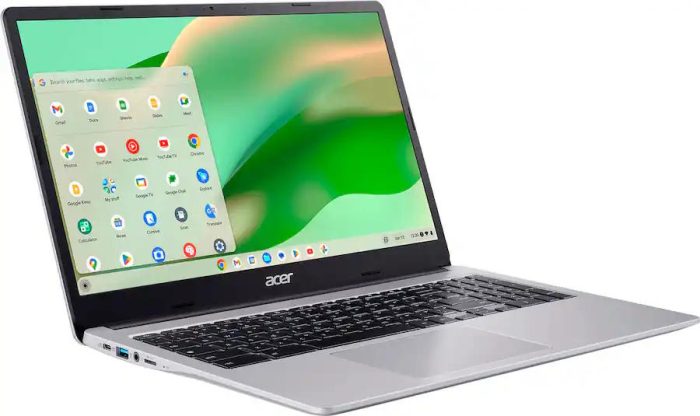
Acer Chromebook 315 CB315-4H-C0BR 15.6″ Laptop with Intel N4500, 4GB RAM, 64GB eMMC, Free Sleeve
Original price was: $299.99.$223.99Current price is: $223.99. Deal on Best Buy Add to Compare -
Low Regular Price
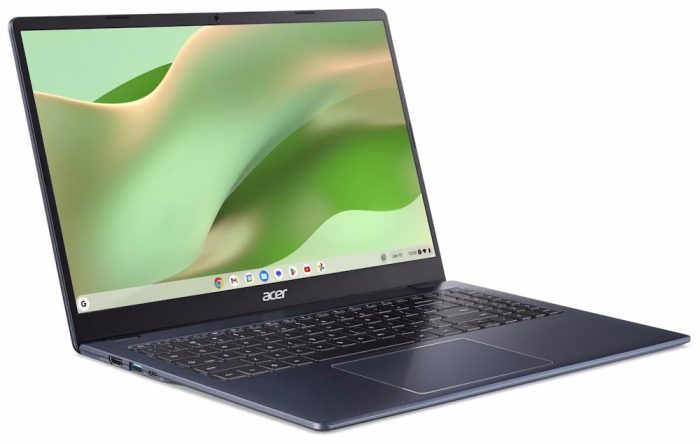
Acer Chromebook 315 CB315-7H-C7F8 15.6″ Laptop with Intel Processor N50, 4GB RAM, 128GB eMMC
$239.00 Deal on Walmart Add to Compare

At a sub-$200 price point the CB315-4H-C7A1 is a solid Chromebook deal. Intel Celeron N4500 runs noticeably smoother than other Celerons like N4120 commonly found in that price range. 4GB RAM is low, but given the laptop runs lightweight ChromeOS, this isn’t as major problem as on Windows laptops. Also, the 64GB storage is cramped, but the laptop thankfully has a microSD card slot for additional capacity.
This is an all-right deal if you are a exclusively Walmart shopper, but on Best Buy you have the same laptop for even less and with a free sleeve included: https://cheaplaptopdeals.com/deal/acer-chromebook-315-cb315-4h-c0br/